
🇬🇧

Documentation

Checks#

Checks allow access to the internal data structures of Production Assist using a simplified JavaScript-API and so on automate complex checks.

Multiple scripts can be created for each project. Scripts can also be created across users and used in multiple projects. The checks can be viewed in Resource Manager -> "Automatic Checks".
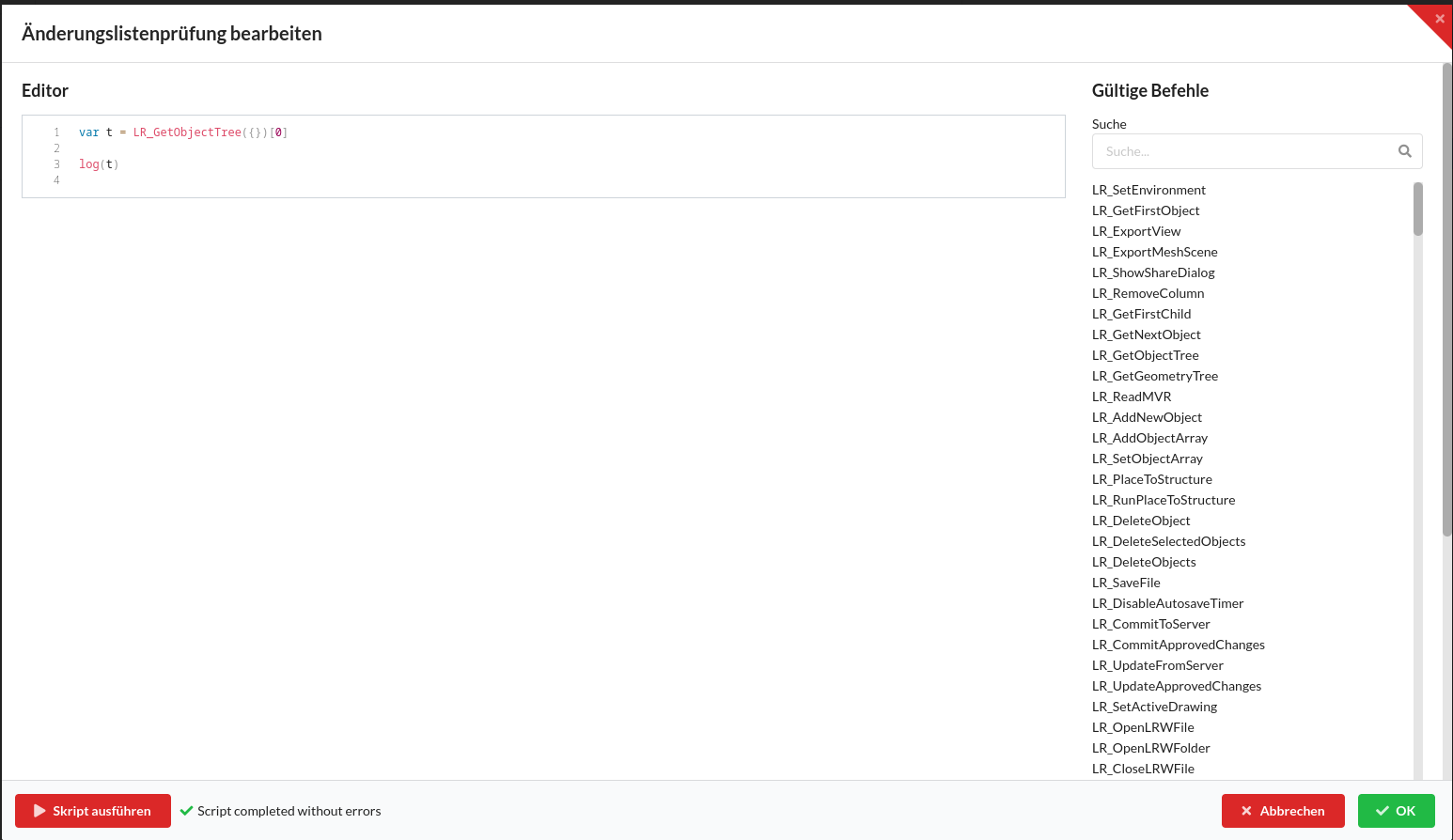
Editor#

The editor allows editing the code on the left and offers a list of available commands on the right. The list of commands is created dynamically. Every function requires an object as the first argument, possibly an empty object, and always returns an object, a list or undefined back. The following functions are used particularly frequently:

CommandArgumentsDescription
LR_GetObjectTree{IncludeGeometries?: boolean, IncludeProperties?: string[]}Returns all objects (and some of their internal data) in the current drawing as a flat, sorted list
LR_GetObject{UUID: uuid}Returns an object and all of the object's internal data. The UUID identifies every object in Production Assist and can be used via LR_GetObjectTree or LR_GetFirstObject be received.

In addition to the internal Production Assist functions are also available Three editor functions available:

CommandDescriptionExample
logPrints a string value to the outputvar t = LR_GetObjectTree({}); log(t[0].Name)
checkChecks whether the first argument true is, if not, the second argument is printedvar t = LR_GetLinkedProject({}); check(t.Project !== "", "Projekt ist nicht mit der cloud verknüpft")
analyzePrints the contents of an object to the output. Different to log it also allows printing of objectsvar t = LR_GetFirstObject({}); analyze(t)

Using Scripts#

Scripts can be incorporated into the workflow in several ways:

  • They can be done manually
  • You can enter calculation reports via "File" -> "Export calculation report as PDF..." using the %%SCRIPT_PROVE_CHECK(SkriptName)%% be inserted
  • They can be used as an automatic check when collaborating

In all cases, the script is not only executed, but also checked for errors. In addition to JavaScript errors, this also includes all of them check-Functions whose first argument false results.

Tips and Tricks#

  • Values ​​returned by Production Assist functions are always created dynamically and can change depending on the context and drawing. Data that can be found in one object can also be found in other objects. By means of the analyzefunction, an object and its data can be viewed and the structure of other objects can be deduced.
  • The log-Function can only output one string at a time, but JavaScript allows numbers, objects and strings to be combined. Line breaks can be done using the control character \n be inserted. See examples
  • Scripts are self-contained and do not allow access to the data of previous scripts. However, there is one exception to this for calculation reports: If several scripts are created using the %%SCRIPT_PROVE_CHECK(SkriptName)%%clause is executed, subsequent scripts can access all global data from previous scripts

Examples#

Data from Production Assist-Analyze#

var tree = LR_GetObjectTree({})

analyze(tree[0])

for(var t = 0; t < tree.length; t++){
  log(tree[t].Name)
}

Save the Current Renderer View as a View#

var obj = LR_AddNewSavedView({Name:'My new name'})
log(obj.Name)

log-Function#

var a = 1
var b = "test"

log("result: " + a + " -- " + b)

check-Function#

var tree = LR_GetObjectTree({})

var a = tree[4]
var b = tree[5]

check(a.Weight > 0, "Item " + a.Name + " has no weight! Check the Object")

analyze-Function#

var tree = LR_GetFirstObject({})

analyze(tree)

Differences from Other JavaScript Engines#

Production Assist uses a minimized JavaScript engine, which does not provide some features of the modern JavaScript. These include in particular:

  • let is not available
  • for(... of ...) Loops are not available
  • async / await is not available
  • console.log is not available

LightRight C++ → JS Bridge API reference#

Complete reference of all API functions available from the C++ core (core/jsbridge/module_main.cpp) can be exported via NAN to JavaScript.

Table of Contents#

  1. Initialization & Lifecycle
  2. File Operations
  3. Server Synchronization
  4. Object Tree Navigation
  5. Object Creation & Deletion
  6. Object Properties & Editing
  7. Selection & Tree Operations
  8. Hierarchical Operations
  9. Geometry Operations
  10. Geometry Editing Modes
  11. Electrical Connections
  12. DMX & Fixtures
  13. Presets & States
  14. Worksheets
  15. Layers
  16. Classes
  17. Selection Groups
  18. Inventory: Trucks, Cases & Racks
  19. Users
  20. Meshes & Textures
  21. Import Formats
  22. Export Formats
  23. Symbol Definitions
  24. Resources & Server Resources
  25. Authentication & Login
  26. Collaboration & Sharing
  27. Templates: Cross Sections
  28. Templates: Materials
  29. Templates: Symbol Maps
  30. Templates: Trucks, Cases & Racks
  31. Templates: Paper & Print Formats
  32. Templates: Property Templates
  33. Templates: Connectors
  34. Templates: Bridle Parts Sets
  35. Templates: Calculation & Documentation Reports
  36. VW Field Mapping
  37. Color Codes
  38. Departments
  39. Load Combinations & Groups
  40. Structural Calculations & Results
  41. Support & Hoisting
  42. Timeline & Phases
  43. Notes
  44. Saved Views
  45. Print Labels
  46. Graph Groups
  47. Batch & Array Operations
  48. Ordering Operations
  49. Undo/Redo
  50. Clipboard Operations
  51. Duplication & Mirroring
  52. Patching & Data Patching
  53. Assembly Groups & Sorting
  54. Settings & Configuration
  55. Dialogs & User Interface
  56. Print & Export Views
  57. MA3 / DMX Monitoring
  58. Log100 Connections
  59. Network & Remote Access
  60. MVRxchange Integration
  61. Host Application Integration
  62. Linked Projects & Branches
  63. Custom Checks & Validation
  64. Custom Scripts & Commands
  65. Chatbot Settings
  66. Gels & Color Filtering
  67. Property Management
  68. Costs & Pricing
  69. Digital Signing
  70. Tabular Calculations
  71. Miscellaneous Utilities
  72. Testing & Debugging
  73. DWG Library

1. Initialization & Lifecycle#

LR_SetEnvironment#

Initializes the application environment with paths and startup options.

ParameterTypeDescription
AppDataPathStringCustom app data directory
GeneralAppDataPathStringShared app data directory
AppDirStringApplication installation directory
HomeDirStringUser home directory
StartServerBoolSpecifies whether to start the integrated server
StartWebSocketsBoolSpecifies whether to start WebSocket connections
OnlyUseVRConnectionBoolUse VR transport only
TestDefinedBoolRuns in test mode
SlowTestDefinedBoolRuns the slow test suite
DownloadDirStringPath to the download directory

LR_MainTick#

Executes a tick of the main application loop. No parameters.

LR_Sleep#

Pauses the current thread for a specified duration.

ParameterTypeDescription
MillisecondsIntegerSleep time in milliseconds (default: 200)

LR_BeforeShutDownApp#

Performs shutdown preparation. Returns JSON AllowClose (Bool) back.

LR_ReloadUI#

Forces a UI reload. No parameters.


2. File Operations#

LR_OpenLRWFile#

Opens a LightRight project file.

ParameterTypeDescription
PathStringFile path (optional, opens file selector if empty)
AsyncBoolSpecifies whether to open asynchronously

LR_OpenLRWFileFromUrl#

Downloads a project from the server and opens it.

ParameterTypeDescription
UserStringServer username
ProjectStringProjektkennung
BranchStringBranch name
SigningJobStringSigning job ID (optional)
AsyncBoolSpecifies whether to open asynchronously

LR_OpenLRWFolder#

Opens a folder-based project with session tracking.

ParameterTypeDescription
PathStringOrdnerpfad
FileIDStringDateikennung
SessionIDStringSession tracking ID
AsyncBoolSpecifies whether to open asynchronously

LR_CloseLRWFile#

Closes a drawing file.

ParameterTypeDescription
PathStringFile path (optional)
SessionIDStringSession to be cleaned up

LR_SaveFile#

Saves the drawing to disk.

ParameterTypeDescription
PathStringSave path (optional, uses current path or opens dialog)
SaveAsBoolForces the Save As dialog

LR_SaveSceneJson#

Saves the drawing as a raw JSON scene file.

ParameterTypeDescription
PathStringOutput file path

LR_DisableAutosaveTimer#

Enables or disables autosave.

ParameterTypeDescription
DisableAutosaveTimerBooltrue to disable

LR_GetCurrentDrawingPath#

Returns the file path of the active drawing. Returns JSON.

LR_GetDrawings#

Returns a list of all open drawings with the UUID of the active drawing. Returns JSON.

LR_DrawingPathExist#

Checks whether a drawing with the specified path is already open. Returns JSON (Bool).

LR_SetActiveDrawing#

Switches to a specified drawing or removes a server copy.

ParameterTypeDescription
DrawingUUIDUUIDDrawing to activate (optional)
DeleteServerDrawingBoolSpecifies whether to remove the server copy

LR_CreateNewDrawing#

Creates a new blank drawing. No parameters.

LR_GetAvailableWebsocketPorts#

Reads available WebSocket ports from the configuration. Returns a JSON array.


3. Server Synchronization#

LR_CheckoutProject#

Downloads a project from the server and opens it as a new drawing.

ParameterTypeDescription
ProjectStringProjektkennung
UserStringServer username
BranchStringBranch name
BranchNameStringBranch display name

LR_CommitToServer#

Transfers current drawing changes to the server. If there are conflicts, a diff dialog is displayed. No parameters. Asynchronous.

LR_CommitApprovedChanges#

Completes a server commit after conflict resolution.

ParameterTypeDescription
DifferencesJSONApproved changes from the diff dialog
MessageStringCommit message

LR_CommitRessourceDrawing#

Transfers a resource drawing to the server. No parameters. Asynchronous.

LR_CommitRessourceDrawingApprovedChanges#

Completes the commit of a resource drawing after conflict resolution.

ParameterTypeDescription
DifferencesJSONApproved changes
MessageStringCommit message

LR_UpdateFromServer#

Retrieves the latest changes from the server and displays the diff dialog. No parameters. Asynchronous.

LR_UpdateApprovedChanges#

Applies approved changes from a server update to the active drawing. Expects the diff data as an input object.

LR_CheckoutRessourceDrawing#

Downloads a resource drawing from the server and opens it.

ParameterTypeDescription
IdentifierStringResource identifier
RevisionIdStringRevision ID
UserStringServer username

LR_CompareToActiveDrawing#

Compares a drawing file with the active drawing.

ParameterTypeDescription
UUIDUUIDDrawing to compare

LR_CompareTwoServerDrawings#

Compares two server-side drawings.

ParameterTypeDescription
FolderStringProjektordner
BaseStringBasic revision
TargetStringTarget revision

LR_MergeTwoServerDrawings#

Merges two server-side branches.

ParameterTypeDescription
FolderStringProjektordner
BaseStringBase branch
TargetStringTarget branch
OptionObjectMerge options (CopyResources, UpdateObjects)
BaseOnlyArrayElements only in the base
TargetOnlyArrayElements only in the target

LR_MergeTwoServerDrawingsTemplate#

Merges two server drawings using template matching.

ParameterTypeDescription
FolderBaseStringBasisordner
FolderTargetStringTarget folder
BaseStringBasiskennung
TargetStringZielkennung

LR_ApplyDiff#

Applies a diff to the drawing.

ParameterTypeDescription
ApplyToUUIDZielzeichnung
ApplyFromUUIDQuellzeichnung
DiffObjectDiff data

LR_UpdateFromBranch#

Synchronized from a server branch.

ParameterTypeDescription
BranchStringBranch name

LR_UpdateFromTemplate#

Updates the drawing based on a linked template. No parameters.

LR_CreateBranchAsync#

Asynchronously creates a new project branch.

ParameterTypeDescription
NameStringBranch name

LR_DeleteGroupOnServer#

Removes a group on the server.

ParameterTypeDescription
FolderStringProjektordner
GroupNameStringGroup name
FileStringDateikennung

4. Object Tree Navigation#

LR_GetFirstObject#

Returns the root object of the scene. Returns JSON.

LR_GetFirstChild#

Returns the first child of an object.

ParameterTypeDescription
UUIDUUIDParent object

LR_GetNextObject#

Returns the closest sibling of an object.

ParameterTypeDescription
UUIDUUIDCurrent object

LR_GetObjectTree#

Gets the hierarchical object tree with optional properties and geometry. Asynchronous.

ParameterTypeDescription
FirstUUIDUUIDRoot UUID (optional)
CompleteTreeBoolInclude full subtree
IncludeGeometriesBoolInclude geometry data
ForceObjectTreeBoolForce tree structure
IncludePropertiesArrayProperty names to include
IncludeGeometryPropertiesArrayGeometry property names to include
ResolveContainerBoolExplode container objects
UseSortingBoolEnable sorting
OrderReversedBoolReverse sort order

LR_GetGeometryTree#

Gets the geometry hierarchy for a container. Asynchronous.

ParameterTypeDescription
ObjectUUIDUUIDRoot container UUID
ResolveContainerBoolExplode container objects

LR_GetCompleteObject#

Returns complete object data using the UUID.

ParameterTypeDescription
UUIDUUIDObject to retrieve

LR_GetSelectiveObject#

Returns an object with only selected properties. Asynchronous.

ParameterTypeDescription
UUIDUUIDObject to retrieve
IncludePropertiesArrayProperty names to include

LR_GetCompleteFirstObject#

Returns complete data for the root object. No parameters. Returns JSON.

LR_GetCompleteFirstChild#

Returns full data for the first child object.

ParameterTypeDescription
UUIDUUIDParent object

LR_GetCompleteNextObject#

Returns full data for the next sibling element.

ParameterTypeDescription
UUIDUUIDCurrent object

5. Object Creation & Deletion#

LR_AddNewObject#

Creates a new drawing object with full transformation control. When insterting a Symbol (ResourceType : 3) make sure that this is the default symbol first.

ParameterTypeDescription
NoReturnValueBoolSkip return value for performance reasons
ResourceTypeIntegerResource type to create
magnetUUIDUUIDMagnet snap target (optional)
ResourceContainerUUIDUUIDResource container reference
UUIDUUIDPredefined UUID (optional)
ParentUUIDUUIDParent object
MatrixMatrix4x4Full transformation matrix (optional)
offsetMagnetBoolApply magnetic offset
SnappedPointsArraySnap data
PxFloatPosition X
PyFloatPosition Y
PzFloatPosition Z
P2xFloatViewpoint X
P2yFloatViewpoint Y
P2zFloatViewpoint Z
QxFloatOrientation quaternion
QyFloatOrientation quaternion
QzFloatOrientation quaternion
QwFloatOrientation quaternion
SxFloatScaling X
SyFloatScaling Y
SzFloatScaling Z

LR_AddNewObject_Line#

Creates an array of objects along a line between two points.

ParameterTypeDescription
ResourceTypeIntegerResource type
DistanceBetweenObjectsFloatDistance between objects
ExtrusionHeightFloatExtrusion height
Px1FloatStartposition
Py1FloatStartposition
Pz1FloatStartposition
Px2FloatEndposition
Py2FloatEndposition
Pz2FloatEndposition
Qx1FloatStart orientation quaternion
Qy1FloatStart orientation quaternion
Qz1FloatStart orientation quaternion
Qw1FloatStart orientation quaternion
Qx2FloatEnd orientation quaternion
Qy2FloatEnd orientation quaternion
Qz2FloatEnd orientation quaternion
Qw2FloatEnd orientation quaternion

LR_AddObjectArray#

Creates objects from a typed array definition.

ParameterTypeDescription
TypeIntegerArray type
PropsObjectArray properties

LR_SetObjectArray#

Updates an existing object array.

ParameterTypeDescription
TypeIntegerArray type
PropsObjectUpdated properties

LR_DeleteObject#

Deletes a single object.

ParameterTypeDescription
UUIDUUIDObject to delete
IfSelectedAllSelectedBoolDelete all selected when target is selected

LR_DeleteSelectedObjects#

Deletes all currently selected objects. No parameters.

LR_DeleteObjects#

Deletes multiple objects using a UUID list.

ParameterTypeDescription
UUIDListArrayUUIDs to delete

6. Object Properties & Editing#

LR_GetObject#

Returns basic object information using the UUID.

ParameterTypeDescription
UUIDUUIDObject to retrieve

LR_SetObject#

Updates values in the Object Properties as well as position, rotation and scale.

ParameterTypeDescription
UUIDUUIDObject to update
UseDefaultBoolApply default values
PresetUUIDPreset to apply (optional)
Use_quaternion_and_posBoolUse position/quaternion transformations
MatrixMatrix4x4Full matrix (optional)
RotByDirStartXFloatDirection of rotation start
RotByDirStartYFloatDirection of rotation start
RotByDirStartZFloatDirection of rotation start
RotByDirEndXFloatDirection of rotation end
RotByDirEndYFloatDirection of rotation end
RotByDirEndZFloatDirection of rotation end
RotByDirUpXFloatRotation Up Vector
RotByDirUpYFloatRotation Up Vector
RotByDirUpZFloatRotation Up Vector
PxFloatPosition X, Y, Z
PyFloatPosition X, Y, Z
PzFloatPosition X, Y, Z
QxFloatOrientation quaternion
QyFloatOrientation quaternion
QzFloatOrientation quaternion
QwFloatOrientation quaternion
P2xFloatBlickpunkt
P2yFloatBlickpunkt
P2zFloatBlickpunkt
SxFloatScaling X, Y, Z
SyFloatScaling X, Y, Z
SzFloatScaling X, Y, Z

LR_SetMultipleObjects#

Batch updates properties of multiple objects. Expects an array of objects, each with UUID, UseDefault and Preset.

LR_GetObjectProperties#

Retrieves detailed properties of an object. Asynchronous.

ParameterTypeDescription
UUIDUUIDObject (optional, uses selection)
CalcResultsBoolInclude calculation results

LR_SetObjectProperties#

Sets Object Properties with mode control.

ParameterTypeDescription
PropertySettingModeIntegerEinstellungsmodus
ApplyToChildObjectBoolApply to child objects

LR_SetAlignedValue#

Sets an aligned/distributed property value across multiple objects.

ParameterTypeDescription
typeIntegerAusrichtungstyp
PropertyStringProperty name
value1JSONStartwert
value2JSONEndwert
PresetUUIDPreset reference (optional)

LR_GetPropertyValue#

Gets a single property value. Asynchronous.

ParameterTypeDescription
UUIDUUIDObject
PropertyNameStringProperty identifier
ArrayNameStringArray property name (optional)
ArrayPositionIntegerArray index (optional)
IncludeUnitBoolInclude unit in result

LR_SetWeightForObject#

Sets the weight for objects.

ParameterTypeDescription
ObjectsArrayObject UUIDs
WeightFloatGewichtswert
SetForAllBoolApply to everyone

LR_MoveObjectToPoint#

Moves objects to specific coordinates.

ParameterTypeDescription
ObjectsArrayObject UUIDs
PayloadStringZielkennung
MoveLoadPointBoolMove load point
XFloatZielkoordinaten
YFloatZielkoordinaten
ZFloatZielkoordinaten

7. Selection & Tree Operations#

LR_Select#

Selects objects with full mode control.

ParameterTypeDescription
SelectionModeIntegerAuswahlmodus
SelectionGroupModeIntegerGroupnauswahlmodus
SelectedListArrayUUID list
PropertyNameStringProperty for selection
ArrayNameStringArray property name
ShiftKeyBoolShift modifier
MetaKeyBoolMeta/cmd modifier
AltKeyBoolAlt modifier
SelectedBoolSelect/Deselect
UseDrawingOrderBoolPay attention to the order of characters
ZoomToSelectionBoolAutomatically zoom to selection

LR_SelectAll#

Selects or deselects all objects.

ParameterTypeDescription
ValueBooltrue to select all, false to deselect

LR_SelectChildren#

Selects all children of an object.

ParameterTypeDescription
UUIDUUIDParent object

LR_CollapseChildren#

Collapses child objects in the tree view.

ParameterTypeDescription
UUIDUUIDParent object

LR_SelectNext#

Navigates and selects in the tree.

ParameterTypeDescription
SelectAdditionBoolAdd to selection

LR_SelectPrev#

Navigates and selects in the tree.

ParameterTypeDescription
SelectAdditionBoolAdd to selection

LR_SelectUp#

Navigates and selects in the tree.

ParameterTypeDescription
SelectAdditionBoolAdd to selection

LR_SelectDown#

Navigates and selects in the tree.

ParameterTypeDescription
SelectAdditionBoolAdd to selection

LR_ExpandAll#

Expands or collapses all tree nodes.

ParameterTypeDescription
ValueBooltrue to expand, false to collapse

LR_GetSelectedObjects#

Returns an array of UUIDs of selected objects.

ParameterTypeDescription
IncludeGeometriesBoolInclude geometry objects

LR_GetSelectedObjectCount#

Returns the number of selected objects. Returns JSON (Integer).

LR_MoveSelectedUp#

Moves selected objects up/down in the tree. No parameters.

LR_MoveSelectedDown#

Moves selected objects up/down in the tree. No parameters.


8. Hierarchical Operations#

LR_SetChild#

Makes one object the child of another.

ParameterTypeDescription
ParentUUIDUUIDNew parent object
ChildUUIDUUIDObject to be reassigned
GlobalCoordinatesBoolMaintain global position

LR_SetNext#

Sets the sibling relationship to the subsequent element.

ParameterTypeDescription
PrevUUIDUUIDPrevious sibling element
NextUUIDUUIDNext sibling element
GlobalCoordinatesBoolMaintain global position

LR_SetPrev#

Sets the sibling relationship to the previous element.

ParameterTypeDescription
PrevUUIDUUIDPrevious sibling element
NextUUIDUUIDCurrent object
GlobalCoordinatesBoolMaintain global position

LR_GroupSelected#

Creates a group from the current selection.

ParameterTypeDescription
NameStringGroup name

LR_DisolveGroup#

Dissolves objects from a group.

ParameterTypeDescription
UUIDUUIDGroup to be disbanded

9. Geometry Operations#

LR_GetFirstChildGeometry#

Returns geometry objects using the UUID. Each function expects a UUID parameter.

LR_GetNextGeometry#

Returns geometry objects using the UUID. Each function expects a UUID parameter.

LR_GetGeometry#

Returns geometry objects using the UUID. Each function expects a UUID parameter.

LR_GetGeometryTransformFromObject#

Returns the transformation of a geometry relative to its parent object.

ParameterTypeDescription
ObjectUUIDParent object
GeometryUUIDGeometrieobjekt

LR_SetGeometry#

Updates a geometry object.

ParameterTypeDescription
UUIDUUIDGeometry to update
PresetUUIDPresets (optional)
UseDefaultBoolApply default values

LR_SetGeometryDefiningResource#

Associates a geometry with a resource definition.

ParameterTypeDescription
ObjectUUIDUUIDObject
GeometryUUIDUUIDGeometry

LR_AddNewStructureGeometry#

Creates a truss structure geometry between two points.

ParameterTypeDescription
ParentUUIDUUIDParent object
RotationFloatRotationswinkel
CrossSectionStringQuerschnittsname
UseAsInternalStructureBoolMark as internal structure
NameStringName
FromXFloatStartpunkt
FromYFloatStartpunkt
FromZFloatStartpunkt
ToXFloatEndpunkt
ToYFloatEndpunkt
ToZFloatEndpunkt
RFloatColor (0.0–1.0)
GFloatColor (0.0–1.0)
BFloatColor (0.0–1.0)

LR_AddNewSupportGeometry#

Creates a bearing/hoist geometry.

ParameterTypeDescription
ParentUUIDUUIDParent object
CrossSectionStringQuerschnittsname
FromXFloatStartpunkt
FromYFloatStartpunkt
FromZFloatStartpunkt
ToXFloatEndpunkt
ToYFloatEndpunkt
ToZFloatEndpunkt

LR_AddNewPolygonGeometry#

Creates a polygon geometry.

ParameterTypeDescription
ParentUUIDUUIDParent object
ObjectPathArrayPath points.
NameStringPolygonname
ClosedBoolClosed path
FilledBoolFilled polygon

LR_SetDefiningResourceGeometry#

Updates the defining resource of a geometry.

ParameterTypeDescription
ObjectUUIDUUIDObject
GeometryUUIDUUIDGeometry

LR_GetCrossSectionByColor#

Gets a cross section associated with a color.

ParameterTypeDescription
CrossSectionBaseNameStringBasisname
RFloatFarbwerte
GFloatFarbwerte
BFloatFarbwerte

10. Geometry Editing Modes#

LR_OpenGeometryEditMode#

Opens the geometry editor.

ParameterTypeDescription
UUIDUUIDObject to edit
SelectedBoolUse selected objects
ObjectBoolEdit geometry at the object level

LR_CloseGeometryEditMode#

Closes the geometry editor.

ParameterTypeDescription
KeepChangesBoolSave changes on exit

LR_GetGeometryEditMode#

Returns the current edit mode state. Returns JSON.

LR_OpenPolygonRendererViewEditMode#

Opens the Polygon Renderer Editor.

ParameterTypeDescription
UUIDUUIDObject to edit

LR_ClosePolygonRendererViewEditMode#

Closes the Polygon Renderer Editor.

ParameterTypeDescription
RendererViewSavedViewObjectView state to restore

LR_GetPolygonRendererViewEditMode#

Returns the edit mode state of the polygon renderer. Returns JSON.


11. Electrical Connections#

LR_AddElectricalConnection#

Creates electrical connections at the connector level. Expects an array or a single object with from/to connection details.

LR_RemoveElectricalConnection#

Removes electrical connections at the connector level. Expects an array or a single object with from/to information.

LR_ClearElectricalConnection#

Deletes all connections on a specified port.

ParameterTypeDescription
ObjectsArrayObject UUIDs
SocketIntegerConnection index

LR_AddElectricalObjectConnection#

Connects two electrical objects via cables. Expects an array or a single object with from/to object/line details.

LR_RemoveElectricalObjectConnection#

Removes electrical object connections. Expects an array or a single connection specification.

LR_AddAndRemoveElectricalObjectConnection#

Add and remove electrical connections in batches.

ParameterTypeDescription
AddArrayConnections to add
RemoveArrayConnections to remove

LR_ResolveMultipleOutputUsage#

Resolves multiple output connections on a connector.

ParameterTypeDescription
ConnectorSelectionObjectConnector info
ObjectListArrayObject UUIDs

LR_SetUsedCables#

Sets selected cables for a connector.

ParameterTypeDescription
GeometryUUIDGeometriereferenz
SelectedCablesArrayCable UUIDs

LR_SetCableColor#

Sets the color of a cable.

ParameterTypeDescription
UUIDUUIDCable-UUID
CieColorStringCIE color value
portNameStringPort name

LR_GetElectricalObjects#

Returns circuit-connected objects. Asynchronous.

ParameterTypeDescription
IncludePropertiesArrayProperty names to include
CompleteTreeBoolInclude full tree

LR_GetElectricalGeometries#

Returns 2D electrical plan geometries. Asynchronous.

ParameterTypeDescription
UUIDsArrayObject UUIDs to query

LR_GetCurrentElectricalTree#

Returns the DMX tree with conflict information. Returns JSON.

LR_GetCurrentSimpleElectricalTree#

Returns a simplified electrical tree. Returns JSON.

LR_ReRunElectricalCalculation#

Recalculates the electrical routing. No parameters.


12. DMX & Fixtures#

LR_GetFixtureTypes#

Lists all available fixture types. Returns JSON.

LR_GetFixtureTypesFromObject#

Returns the fixture type for a given object.

ParameterTypeDescription
UUIDUUIDObject

LR_SetFixtureTypes#

Assigns fixture types.

ParameterTypeDescription
FixtureTypesArrayFixture type assignments

LR_NumberAllFixtures#

Automatically numbers fixtures starting from a reference object.

ParameterTypeDescription
UUIDUUIDStartobjekt

LR_AddNewDmxMode#

Adds a DMX mode to a fixture type.

ParameterTypeDescription
UUIDUUIDFixture type
NameStringModusname
DmxFootPrint1IntegerDMX channel footprints
DmxFootPrint2IntegerDMX channel footprints
DmxFootPrint3IntegerDMX channel footprints
DmxFootPrint4IntegerDMX channel footprints

LR_SetDefaultFixtureType#

Sets the default fixture type.

ParameterTypeDescription
UUIDUUIDFixture type

LR_GetLastFixtureTypes#

Returns recently used fixture types. Returns JSON.

LR_GetDmxTree#

Returns the DMX universe structure. Returns JSON.

LR_ReplaceSelectedFixtureTypes#

Replaces fixture types on selected objects. No parameters.

LR_GetDuplicatedFixtureIDs#

Searches for duplicate fixture IDs in the drawing. Returns JSON.

LR_GetDuplicatedObjectIds#

Searches for duplicate object IDs. Returns JSON.


13. Presets & States#

LR_AddNewPreset#

Creates a new preset from the current object state. Returns JSON.

LR_DeletePreset#

Removes a preset. Accepts UUID.

LR_GetPresets#

Lists all presets. Returns JSON.

LR_SetPreset#

Updates preset properties. Expects UUID and property data.

LR_SetEditablePreset#

Marks a preset as editable. Returns JSON.

ParameterTypeDescription
UUIDUUIDPreset

LR_SetActivePreset#

Enables or disables a preset.

ParameterTypeDescription
UUIDUUIDPreset
ActiveBoolActive state

LR_SetPresetOrder#

Changes the order of the presets. Expects an array of UUIDs.

LR_DeactivatePresets#

Disables all presets. No parameters.

LR_RemovePresetEntry#

Removes an entry from a preset.

ParameterTypeDescription
PresetUUIDUUIDPreset
PropertyNameStringProperty to remove
ObjectsArrayAffected objects

LR_GetPresetContent#

Returns the contents of a preset.

ParameterTypeDescription
UUIDUUIDPreset

LR_GetAllPresetsContent#

Returns the contents of all presets. Returns JSON.

LR_GetAllActiveFixtures#

Returns all active fixture objects. Returns JSON.

LR_GetFixturesByAlignment#

Returns fixtures grouped by orientation. Returns JSON.


14. Worksheets#

LR_AddNewWorksheet#

Creates a new worksheet.

ParameterTypeDescription
ObjectUUIDsArrayObject UUIDs to include (optional)
ObjectUUIDUUIDSingle object (optional)
LayerUUIDUUIDFilter by level (optional)
ClassUUIDUUIDFilter by class (optional)
AppendNameStringAppend to worksheet name

LR_DeleteWorksheet#

Deletes a worksheet.

ParameterTypeDescription
UUIDUUIDWorksheet (optional, individual)
UUIDSArrayMultiple worksheets (optional)

LR_GetWorksheets#

Lists all worksheets. Returns JSON.

LR_GetWorksheetObjects#

Returns objects on a worksheet. Asynchronous.

ParameterTypeDescription
UUIDUUIDWorksheet
ResolveContainerBoolDissolve containers
IncludeGeometriesBoolInclude geometries

LR_SetWorksheet#

Updates worksheet properties.

ParameterTypeDescription
UUIDUUIDWorksheet
WorksheetsArrayUUIDs.Updated data (optional)

LR_SetWorksheetOrder#

Changes the order of the worksheets. Expects an array of UUIDs.

LR_GetWorksheetActivePresets#

Returns active presets for a worksheet.

ParameterTypeDescription
UUIDUUIDWorksheet

LR_DuplicateWorksheet#

Clones a worksheet.

ParameterTypeDescription
UUIDUUIDWorksheet to duplicate

LR_CreateAssemblySheetsForGroups#

Automatically creates assembly worksheets from groups. Expects the object data.

LR_ShowWorkSheet#

Displays a worksheet in the user interface.

ParameterTypeDescription
UUIDUUIDWorksheet

LR_GetForcedWorksheet#

Returns the UUID of the mandatory worksheet. Returns JSON.

LR_WorksheetFilterHelper#

Filters objects for a worksheet. Asynchronous.

ParameterTypeDescription
WorksheetUUIDUUIDWorksheet
UuidToFilterArrayUUIDs to check
WorksheetViewTypeIntegerViewType

15. Layers#

LR_AddNewLayer#

Creates a new layer from the input object. Returns JSON.

LR_DeleteLayer#

Deletes a layer. Accepts UUID.

LR_DeleteLayers#

Deletes multiple layers. Expects UUIDList (array).

LR_GetLayer#

Returns layer information. Accepts UUID. Returns JSON.

LR_GetLayers#

Lists all levels. Returns JSON.

LR_SetLayer#

Updates a layer.

ParameterTypeDescription
ModifierKeyBoolModify key pressed
UUIDUUIDLayer

LR_SetLayers#

Updates layers in batches.

ParameterTypeDescription
LayerObjectsArrayLayer data objects

LR_GetActiveLayer#

Returns the currently active layer. Returns JSON.

LR_SetActiveLayer#

Sets the active layer.

ParameterTypeDescription
LayerUUIDLayer to activate

16. Classes#

LR_AddNewClass#

Creates a new class from the input object. Returns JSON.

LR_DeleteClass#

Deletes a class. Accepts UUID.

LR_DeleteClasses#

Deletes multiple classes. Expects UUIDList (array).

LR_GetClass#

Returns class information. Accepts UUID. Returns JSON.

LR_GetClasses#

Lists all classes. Returns JSON.

LR_SetClass#

Updates a class.

ParameterTypeDescription
ModifierKeyBoolModify key pressed
UUIDUUIDClass

LR_SetClasses#

Updates classes in batches.

ParameterTypeDescription
ClassObjectsArrayClass data objects

LR_GetActiveClass#

Returns the currently active class. Returns JSON.

LR_SetActiveClass#

Sets the active class.

ParameterTypeDescription
ClassUUIDClass to activate

17. Selection Groups#

LR_AddSelectionGroupForFixturesInLine#

Creates a selection group of fixtures along a line.

ParameterTypeDescription
SelectedBoolUse selected objects

LR_AddNewSelectionGroup#

Creates a new selection group.

ParameterTypeDescription
PushSelectedBoolAdd selected objects to the group

LR_DeleteSelectionGroup#

Deletes a selection group. Accepts UUID.

LR_GetSelectionGroups#

Lists all selection groups. Returns JSON.

LR_AddObjectToSelectionGroup#

Adds an object to a group.

ParameterTypeDescription
GroupUUIDAuswahlgruppe
ObjectUUIDObject to add

LR_SetSelectionGroup#

Updates a selection group. Accepts UUID.


18. Inventory: Trucks, Cases & Racks#

LR_AddNewTruck#

CRUD operations for trucks. Add/Get returns JSON. Delete/Set expects UUID.

LR_DeleteTruck#

CRUD operations for trucks. Add/Get returns JSON. Delete/Set expects UUID.

LR_GetTrucks#

CRUD operations for trucks. Add/Get returns JSON. Delete/Set expects UUID.

LR_GetTruck#

CRUD operations for trucks. Add/Get returns JSON. Delete/Set expects UUID.

LR_SetTruck#

CRUD operations for trucks. Add/Get returns JSON. Delete/Set expects UUID.

LR_GetTruckObjects#

Returns objects assigned to a truck. Asynchronous. Accepts UUID.

LR_AddNewCase#

Creates a new case.

ParameterTypeDescription
amountToAddIntegerNumber of cases to be created

LR_GetCases#

CRUD for cases. Accepts UUID for Set/Delete.

LR_SetCase#

CRUD for cases. Accepts UUID for Set/Delete.

LR_DeleteCase#

CRUD for cases. Accepts UUID for Set/Delete.

LR_AddNewRack#

Creates a new rack.

ParameterTypeDescription
RackTemplateStringVorlagenname

LR_GetRacks#

CRUD for racks. Accepts UUID for Set/Delete.

LR_SetRack#

CRUD for racks. Accepts UUID for Set/Delete.

LR_DeleteRack#

CRUD for racks. Accepts UUID for Set/Delete.

LR_GetInventoryData#

Returns inventory data (grouped). Asynchronous.

ParameterTypeDescription
FirstUUIDUUIDRoot object
WorksheetStateObjectWorksheet configuration
UseGroupingBoolEnable grouping

LR_GetInventorySummery#

Returns an inventory summary. Asynchronous. No parameters.

LR_GetInventoryContainerOptions#

Returns UI options for inventory containers. Returns JSON.

LR_GetTableViewGroupingData#

Returns grouped table view data. Asynchronous.

ParameterTypeDescription
FirstUUIDUUIDRoot object
WorksheetStateObjectConfiguration
UseGroupingBoolEnable grouping

LR_PackObjectsIntoContainer#

Automatically packs objects into inventory containers.

ParameterTypeDescription
ContainerArrayContainer data. UUIDs
TemplateStringVorlagenname
TemplateTypeIntegerVorlagentyp

19. Users#

LR_AddNewUser#

Adds a user to the project. Returns JSON.

LR_GetUsers#

Lists project users. Returns JSON.

LR_SetUser#

Updates a user. Accepts UUID.

LR_DeleteUser#

Removes a user. Accepts UUID.


20. Meshes & Textures#

LR_GetMeshes#

Lists all meshes.

ParameterTypeDescription
WithCountBoolInclude usage counters

LR_GetMesh#

Returns mesh data. Accepts UUID.

LR_GetMeshesForResources#

Returns meshes for resource references.

ParameterTypeDescription
ResourceUUIDUUIDRessource
ResourceTypeIntegerResource type

LR_SetMesh#

Updates a mesh. Accepts UUID.

LR_SetDefaultMesh#

Sets a mesh as the default. Accepts UUID. Returns JSON.

LR_GetTextures#

Lists all textures. Asynchronous. Returns JSON.

LR_GetSingleTexture#

Returns texture data. Asynchronous.

ParameterTypeDescription
UUIDUUIDTextur
NameStringTexturname

LR_GetExternalDocuments#

Lists external documents. Returns JSON.

LR_DeleteExternalDocument#

Removes an external document. Accepts UUID.

LR_SetPreviewTextures#

Sets textures for preview mode.

ParameterTypeDescription
TexturesArrayTexturdaten

LR_GetPreviewTextures#

Returns preview textures.

ParameterTypeDescription
WriteBufferBoolInclude buffer data

LR_GetPreviewTextureFromObject#

Gets the preview texture of an object.

ParameterTypeDescription
ObjectUUIDObjekt
WriteBufferBoolInclude buffer data

LR_DeleteTexture#

Deletes a texture. Accepts UUID.

LR_GetReportImage#

Returns an image used in a calculation or documentation report as base64. Asynchronous.

ParameterTypeDescription
NameStringImage name (filename relative to the report folder, or 'crossSectionImages/')

21. Import Formats#

LR_ReadIFC#

Imports an IFC building model. Asynchronous.

ParameterTypeDescription
PathStringFile path (optional, opens file selection)

LR_ReadSketchUp#

Imports a SketchUp file. Asynchronous.

ParameterTypeDescription
PathStringFile path (optional)

LR_ReadDWG#

Imports an AutoCAD DWG/DXF file.

ParameterTypeDescription
PathStringFile path (optional)
AsyncBoolAsynchronous mode
ScaleFloatScaling factor
CenterBoolCenter in the drawing

LR_ReadMVR#

Imports an MVR file.

ParameterTypeDescription
PathStringFile path (optional)
AsyncBoolAsynchronous mode
SymbolMapBoolApply symbol mapping
ImportGroupsBoolImport group structure

LR_ReadPDF#

Imports a PDF file. Asynchronous.

ParameterTypeDescription
PathStringFile path (optional)
AsyncBoolAsynchronous mode

LR_ReadMa3Cue#

Imports a MA3 Cue XML file.

ParameterTypeDescription
PathStringFile path (optional)

LR_ImportGdtf#

Imports a GDTF device type file.

ParameterTypeDescription
PathStringFile path (optional)
LastBoolUse last import path

LR_ImportMesh#

Imports a 3D mesh file.

ParameterTypeDescription
PathStringFile path (optional)

LR_ImportMeshScene#

Imports a 3D mesh scene.

ParameterTypeDescription
PathStringLocal file path (optional when Url is provided)
UrlStringURL of the mesh scene to download and import
BackFileStringHintergrunddatei
BackUrlStringURL that receives calculation results via POST

LR_ImportTexture#

Imports a texture image.

ParameterTypeDescription
PathStringFile path (optional)
LastBoolUse last import path

LR_ImportExternalDocument#

Imports an external document.

ParameterTypeDescription
PathStringFile path (optional)

LR_ImportSVG#

Imports an SVG graphic. Asynchronous.

ParameterTypeDescription
PathStringFile path (optional)
AsyncBoolAsynchronous mode

LR_ImportLRWX#

Imports a LightRight export file.

ParameterTypeDescription
PathStringFile path (optional)
AsyncBoolAsynchronous mode
CheckoutBoolCheck out from server
ProjectStringProject (at checkout)
UserStringUser (at checkout)
BranchStringBranch (at checkout)
BranchNameStringBranch display name

LR_ImportDSTV#

Imports a DSTV file.

ParameterTypeDescription
PathStringFile path (optional)
AsyncBoolAsynchronous mode

LR_ImportTradeShowLoadExchange#

Imports a trade show load exchange file.

ParameterTypeDescription
PathStringFile path
DataObjectImportdaten
DataArrayArrayImport data array

LR_ImportPrintLabel#

Imports a print label file.

ParameterTypeDescription
FileStringFile path
UUIDUUIDDesignation-UUID

LR_Import#

General import function.

ParameterTypeDescription
PathStringFile path (optional)
TypeStringImporttyp

LR_ReadVectorworksDrawing#

Reads a Vectorworks drawing. No parameters.


22. Export Formats#

LR_WriteMVR#

Exports the drawing to an MVR file.

ParameterTypeDescription
PathStringOutput path (optional, opens file selection)

LR_WriteCrossSection#

Exports a truss cross section as JSON.

ParameterTypeDescription
PathStringOutput path (optional)
PayLoadObjectQuerschnittsdaten

LR_ExportAsGdtf#

Exported as GDTF device type.

ParameterTypeDescription
PathStringOutput path (optional)

LR_ExportDSTV#

Exported in DSTV format.

ParameterTypeDescription
PathStringOutput path (optional)

LR_ExportIFC#

Exported in IFC building model format.

ParameterTypeDescription
PathStringOutput path (optional)

LR_ExportTradeShowLoadExchange#

Exports trade show load exchange data.

ParameterTypeDescription
PathStringAusgabepfad
TradeShowNameStringName of the fair
HallStringHallenbezeichnung
BoothStringStandbezeichnung
CompanyStringFirmenname

LR_ExportSymbols#

Exports the symbol library.

ParameterTypeDescription
SymbolsArraySymbol-UUIDs
ResourceTypeIntegerResource type (optional)
PathStringOutput path (optional)

LR_ExportPolygon#

Exports a polygon as a mesh.

ParameterTypeDescription
PolygonUUIDPolygon-UUID
PathStringOutput path (optional)

LR_ExportMeshScene#

Exports a 3D mesh scene.

ParameterTypeDescription
PathStringOutput path (optional)
TypeStringExporttyp

LR_Export#

General export function.

ParameterTypeDescription
PathStringOutput path (optional)
TypeStringExporttyp

LR_WritePngToDisk#

Saves a PNG image to disk.

ParameterTypeDescription
PathStringOutput path (optional)
Base64StringBase64 encoded image data

LR_WriteSvgToDisk#

Saves an SVG image to disk.

ParameterTypeDescription
PathStringOutput path (optional)
SVGStringSVG markup

23. Symbol Definitions#

LR_GetSymbolDefs#

Lists all symbol definitions. Returns JSON.

LR_AddNewSymbolDefinition#

Creates a new symbol definition.

ParameterTypeDescription
UUIDUUIDPredefined UUID (optional)
CopySelectedBoolCopy from selected objects

LR_SetSymbolDef#

Updates a symbol definition. Accepts UUID.

LR_SetDefaultSymbolDef#

Sets the default symbol definition. Returns JSON.

ParameterTypeDescription
UUIDUUIDSymbol UUID

LR_GetLastUsedSymbolDefs#

Returns recently used symbol definitions. Returns JSON.

LR_DeleteSymbolContent#

Deletes all geometry from a symbol definition. Accepts UUID.

LR_ReplaceSelectedSymbolDefinition#

Replaces the symbol definition on selected objects. No parameters.

LR_GenerateNewSymbolUuids#

Regenerates UUIDs for symbols. No parameters.

LR_ExplodeObjectSymbolDefinitions#

Replaces all nested symbol definitions in an object with their actual geometry. Returns JSON (Changed: bool).

ParameterTypeDescription
UUIDUUIDTarget object (optional, uses selection if omitted)
SelectedBoolUse first selected object when UUID is not given

24. Resources & Server Resources#

LR_GetRessourceDrawing#

Loads a resource drawing file.

ParameterTypeDescription
FileStringPath to the resource file

LR_ImportRessource#

Imports a resource.

ParameterTypeDescription
FileStringFile path
UUIDUUIDResource-UUID

LR_ImportFixtureType#

Imports a device type definition.

ParameterTypeDescription
FileStringFile path
UUIDUUIDDevice type-UUID

LR_GetServerResource#

Downloads a resource from the server. Returns JSON.

LR_GetServerResourceCached#

Gets a cached server resource. Returns JSON.

LR_GetServerResourceAsync#

Asynchronously downloads a resource from the server.

ParameterTypeDescription
MinifiedBoolUse compressed version

LR_GetUserResource#

Retrieves user-specific resources.

ParameterTypeDescription
UserStringUser name

LR_Get_Available_Truss_SymbolResourceList#

Get the available online resources.

Returns a JSON array.

LR_Get_Available_Support_SymbolResourceList#

Get the available online resources.

Returns a JSON array.

LR_Get_Available_Gdtf_SymbolResourceList#

Get the available online resources.

Returns a JSON array.

LR_Get_Available_DataPatch_SymbolResourceList#

Get the available online resources.

Returns a JSON array.

LR_Get_Available_PowerPatch_SymbolResourceList#

Get the available online resources.

Returns a JSON array.

LR_Get_Available_Led_SymbolResourceList#

Get the available online resources.

Returns a JSON array.

LR_Get_Available_Stage_SymbolResourceList#

Get the available online resources.

Returns a JSON array.

LR_Get_Available_Labels_SymbolResourceList#

Get the available online resources.

Returns a JSON array.

LR_Get_Available_Pipes_SymbolResourceList#

Get the available online resources.

Returns a JSON array.

LR_Get_Available_Generic_SymbolResourceList#

Get the available online resources.

Returns a JSON array.

LR_Get_Available_Television_SymbolResourceList#

Get the available online resources.

Returns a JSON array.

LR_Get_Available_Audio_SymbolResourceList#

Get the available online resources.

Returns a JSON array.

LR_Get_Available_Scaffolding_SymbolResourceList#

Get the available online resources.

Returns a JSON array.

LR_ImportOnlineResource_Symbol#

Import the online resource. Returns the UUID of the imported symbol definition so it can immediately be passed to LR_SetDefaultSymbolDef.

ParameterTypeDescription
UUIDUUIDUUID of the resource

Returns JSON (UUID).

LR_GetUserResourceAsync#

Retrieves user-specific resources.

ParameterTypeDescription
UserStringUser name

LR_ImportServerResourceAsync#

Imports a resource from the server. Asynchronous.

ParameterTypeDescription
UserStringUser name
IdentifierStringResource identifier
UUIDUUIDResource-UUID
ResourceTypeIntegerResource type
RevisionIdStringRevision ID

LR_CacheServerResourceAsync#

Locally caches a server resource. Asynchronous.

ParameterTypeDescription
UserStringUser name
IdentifierStringResource identifier
RevisionIdStringRevision ID

LR_CreateResourceCategoryOnServer#

Creates a resource category on the server.

ParameterTypeDescription
CategoryStringKategoriename
UsernameStringUser name
ParentCategoryStringParent category

LR_UploadSingleResourceToServerAsync#

Uploads a single resource to the server. Asynchronous.

ParameterTypeDescription
UUIDUUIDResource-UUID
UsernameStringUser name
CategoryStringKategorie
FilenameStringDateiname
ManufacturerStringHersteller
DescriptionStringDescription
OverwriteStringOverwrite mode
OverwriteIdentStringOverride identifier

LR_DownloadAllResource#

Downloads all resources from the server. Asynchronous. No parameters.

LR_GetLocaleResources#

Downloads localization resources. Asynchronous. Returns JSON.

LR_GetLocaleResourcesCached#

Retrieves cached localization resources. Returns JSON.

LR_GetCachedResources#

Lists all cached resources. Returns JSON (BasePath, Files).

LR_DuplicateResource#

Duplicates a resource.

ParameterTypeDescription
UUIDUUIDRessource
ResourceTypeIntegerType

LR_DeleteResource#

Deletes a resource.

ParameterTypeDescription
ResourceTypeIntegerType
UUIDUUIDRessource

LR_DeleteUnusedObjects#

Cleans up unused objects from the drawing. No parameters.

LR_GetActiveResource#

Returns the active resource for a given type.

ParameterTypeDescription
ResourceTypeIntegerType

25. Authentication & Login#

LR_LoginToServer#

Authenticated with username and password. Synchronous.

ParameterTypeDescription
UserStringUser name
PasswordStringPasswort

LR_LoginToServerAsync#

Asynchronous login.

ParameterTypeDescription
UserStringUser name
PasswordStringPasswort
StorePasswordBoolSave login details

LR_LoginToServerSSOAsync#

SSO login.

ParameterTypeDescription
UserStringUser name
UUIDStringSSO token

LR_LoginStoredData#

Login with saved login details.

ParameterTypeDescription
TokenStringAuth token
UserStringUser name
LicenceStringLicense key
DefaultResourceUserStringDefault resource user

LR_LogOutFromServer#

Logs out of the server. No parameters.

LR_ValidateToken#

Checks token validity. Returns JSON (Valid, User).

LR_GetLoggedInUser#

Returns information about the current user. Returns JSON (User, DefaultResourceUser, License).

LR_TryToGetUserAccountAsync#

Gets user account information. Asynchronous. No parameters.

LR_ResetPassword#

Resets the user password.

ParameterTypeDescription
UserStringUser name

LR_ValidateUserNameAsync#

Validates a username. Asynchronous.

ParameterTypeDescription
UserStringUsername to validate

26. Collaboration & Sharing#

LR_GetProjectMembers#

Lists project collaborators. Asynchronous. Returns JSON.

LR_AddProjectMember#

Adds a collaborator to the project.

ParameterTypeDescription
UserToReplaceUUIDUser to replace (optional)
UserStringUser to add

LR_SetRoleInProject#

Sets a user's role.

ParameterTypeDescription
UserStringUser name
RoleStringRollenname

LR_SendInvite#

Sends a project invitation.

ParameterTypeDescription
toInviteMailStringE-mail address

LR_FindUserSubset#

Searches for users.

ParameterTypeDescription
searchQueryStringSuchbegriff

LR_CreateShareLinkForProject#

Creates a shareable link for the project.

ParameterTypeDescription
NameStringLinkname

LR_GetShareLinksForProject#

Lists existing sharing links. Asynchronous. Returns JSON.

LR_ShowShareDialog#

Opens the release dialog. No parameters.

LR_GetCollaboratorsAsync#

Gets the employee list. Asynchronous.

ParameterTypeDescription
UserStringUser name

LR_CreateNewProjectAsync#

Creates a new project on the server. Asynchronous.

ParameterTypeDescription
NameStringProject name
selectedFolderStringTarget folder
CollaboratorsArrayCollaborator list
ChecksObjectTest configuration
InvitesObjectInvitation list
GroupsObjectGroupnzuweisungen
ForUserStringOwner username
PrettyNameStringDisplay name
SymbolMapTemplateStringIcon map template
BaseProjectStringBase project
ReviewStringReviewtyp

LR_GetProjectsAsync#

Lists projects. Asynchronous.

ParameterTypeDescription
UserStringUser name

LR_GetOrganizationsAsync#

Lists organizations. Asynchronous.

ParameterTypeDescription
UserStringUser name

LR_GetFoldersAsync#

Lists folders. Asynchronous.

ParameterTypeDescription
UserStringUser name

27. Templates: Cross Sections#

LR_GetTrussCrossSection#

Returns all cross-section definitions. Returns JSON.

LR_GetTrussCrossSectionByName#

Searches for a cross section by name.

ParameterTypeDescription
NameStringQuerschnittsname

LR_SetCrossSectionTemplate#

CRUD for cross-section templates. Set/Delete/Duplicate accept name (string). Add requires no parameters (from input object).

LR_AddCrossSectionTemplate#

CRUD for cross-section templates. Set/Delete/Duplicate accept name (string). Add requires no parameters (from input object).

LR_DeleteCrossSectionTemplate#

CRUD for cross-section templates. Set/Delete/Duplicate accept name (string). Add requires no parameters (from input object).

LR_DuplicateCrossSectionTemplate#

CRUD for cross-section templates. Set/Delete/Duplicate accept name (string). Add requires no parameters (from input object).


28. Templates: Materials#

LR_GetMaterialTemplates#

Lists all materials. Returns JSON.

LR_SetMaterialTemplate#

CRUD for material templates. Set/Delete accept name (string).

LR_AddMaterialTemplate#

CRUD for material templates. Set/Delete accept name (string).

LR_DeleteMaterialTemplate#

CRUD for material templates. Set/Delete accept name (string).


29. Templates: Symbol Maps#

LR_AddSymbolMap#

Adds a symbol mapping entry.

ParameterTypeDescription
FromStringQuellname
ToNameStringZielname
ToUUIDUUIDTarget UUID
ToRessourceIdentStringResource identifier
UserStringUser name

LR_DeleteSymbolMap#

Deletes symbol mappings.

ParameterTypeDescription
FromArrayArraySource names to delete

LR_GetSymbolMap#

Returns all symbol mappings. Returns JSON.

LR_SetSymbolMapTemplate#

Template operations. Each accepts name/template (string).

LR_NewSymbolMapTemplate#

Template operations. Each accepts name/template (string).

LR_DeleteSymbolMapTemplate#

Template operations. Each accepts name/template (string).

LR_UpdateFromSymbolMapTemplate#

Template operations. Each accepts name/template (string).

LR_GetSymbolMapTemplates#

Lists available templates.

ParameterTypeDescription
UserStringUser name

30. Templates: Trucks, Cases & Racks#

LR_AddTruckTemplate#

Creates a truck template.

ParameterTypeDescription
NameStringVorlagenname
SizeXFloat
SizeYFloat
SizeZFloat
AllowablePayloadFloatMaximum payload

LR_DeleteTruckTemplate#

Deletes/updates a truck template. Accepts name (string).

LR_SetTruckTemplate#

Deletes/updates a truck template. Accepts name (string).

LR_GetTruckTemplateMap#

Lists truck templates. Returns JSON.

LR_AddCaseTemplate#

Creates a case template.

ParameterTypeDescription
NameStringVorlagenname
SizeXFloat
SizeYFloat
SizeZFloat
WeightFloatCase weight

LR_DeleteCaseTemplate#

Deletes/updates a case template. Each takes name (string).

LR_UpdateCaseTemplate#

Deletes/updates a case template. Each takes name (string).

LR_AddCaseTemplateSymbol#

Adds or removes icons from a case template.

ParameterTypeDescription
CaseNameStringCase template name
SymbolUuidUUIDSymbol (only for Remove)

LR_RemoveCaseTemplateSymbol#

Adds or removes icons from a case template.

ParameterTypeDescription
CaseNameStringCase template name
SymbolUuidUUIDSymbol (only for Remove)

LR_SetCaseTemplateSymbols#

Sets all icons for a case template.

ParameterTypeDescription
CaseNameStringCase template name
CaseSymbolsArraySymboldaten

LR_GetCaseTemplateMap#

Lists case templates. Returns JSON.

LR_AddRackTemplate#

CRUD for rack templates. Set/Delete accept name (string).

LR_SetRackTemplate#

CRUD for rack templates. Set/Delete accept name (string).

LR_DeleteRackTemplate#

CRUD for rack templates. Set/Delete accept name (string).

LR_GetRackTemplateMap#

Lists rack templates. Returns JSON.


31. Templates: Paper & Print Formats#

LR_SetPaperFormatTemplate#

CRUD for paper format templates. Set/Delete accept name (string).

LR_AddPaperFormatTemplate#

CRUD for paper format templates. Set/Delete accept name (string).

LR_DeletePaperFormatTemplate#

CRUD for paper format templates. Set/Delete accept name (string).

LR_GetPaperFormatTemplateMap#

Lists paper sizes. Returns JSON.

LR_UsePaperFormatTemplate#

Applies a paper size to the drawing. Accepts name (string). Returns JSON.

LR_SetPrintFormatTemplate#

CRUD for print format templates. Set/Delete accept name (string).

LR_AddPrintFormatTemplate#

CRUD for print format templates. Set/Delete accept name (string).

LR_DeletePrintFormatTemplate#

CRUD for print format templates. Set/Delete accept name (string).

LR_GetPrintFormatTemplateMap#

Lists print formats. Returns JSON.

LR_GetSetSelectedPrintFormatTemplate#

Gets or sets the selected print format. Accepts name (string, optional). Returns JSON.


32. Templates: Property Templates#

LR_GetPropertyTemplateMap#

Lists property templates. Returns JSON.

LR_GetPropertyTemplate#

Returns a property template. Accepts name (string). Returns JSON.

LR_AddPropertyTemplate#

Creates a property template.

ParameterTypeDescription
NameStringVorlagenname
WorksheetStateObjectWorksheet state data

LR_DeletePropertyTemplate#

Deletes/updates a property template. Accepts name (string).

LR_SetPropertyTemplate#

Deletes/updates a property template. Accepts name (string).

LR_GetInventoryPropertyTemplateMap#

Lists inventory property templates. Returns JSON.

LR_GetInventoryPropertyTemplate#

Returns an inventory property template. Accepts name (string). Returns JSON.

LR_AddInventoryPropertyTemplate#

Creates an inventory property template.

ParameterTypeDescription
NameStringVorlagenname
WorksheetStateObjectWorksheet state data

LR_SetInventoryPropertyTemplate#

Updates an inventory property template. Accepts name (string).


33. Templates: Connectors#

LR_GetConnectors_Data#

Returns the data connector library. Returns JSON.

LR_GetConnectors_Electric#

Returns the electrical connector library. Returns JSON.

LR_SetConnectorsTemplate#

Updates a connector template.

ParameterTypeDescription
updateAllConnectorsBoolApply to everyone
NameStringConnector name (in the object)

LR_AddConnectorsTemplate#

Creates a connector template from the input object.

LR_DeleteConnectorsTemplate#

Deletes a connector template. Accepts name (string).


34. Templates: Bridle Parts Sets#

LR_GetBridlePartsSetTemplates#

Lists bridle parts set templates. Returns JSON.

LR_SetBridlePartsSetTemplate#

CRUD for Bridle parts set templates. Set/Delete accept name (string).

LR_AddBridlePartsSetTemplate#

CRUD for Bridle parts set templates. Set/Delete accept name (string).

LR_DeleteBridlePartsSetTemplate#

CRUD for Bridle parts set templates. Set/Delete accept name (string).


35. Templates: Calculation & Documentation Reports#

LR_AddCalculationReportTemplate#

Creates a calculation report template.

ParameterTypeDescription
NameStringVorlagenname
ReportStringReport Markdown
BackgroundTemplateUUIDUUIDUUID of the background label
FirstPageBackgroundTemplateUUIDUUIDUUID of the first page designation
PublicShareTokenStringRelease token
PdfFormatNameStringPDF format name

LR_DeleteCalculationReportTemplate#

Deletes a report template. Accepts name (string).

LR_GetCalculationReportTemplateMap#

Lists calculation report templates. Returns JSON.

LR_SetCalculationReportTemplate#

Updates a report template. Accepts name (string).

LR_AddPaperworkReportTemplate#

Creates a documentation report template.

ParameterTypeDescription
NameStringVorlagenname
ReportStringReport Markdown

LR_DeletePaperworkReportTemplate#

Delete/Update accept name (string).

LR_SetPaperworkReportTemplate#

Delete/Update accept name (string).

LR_GetPaperworkReportTemplateMap#

Lists documentation report templates. Returns JSON.

LR_SetCalculationReportMarkdown#

Sets the active calculation report template.

ParameterTypeDescription
ReportStringReport Markdown
SimpleProjectDescriptionStringProject description
FrontUUIDUUID of the front page name
BackUUIDUUID of the background label

LR_GetCalculationReportMarkdown#

Returns the report template. Returns JSON (Report, Front, Back, ShareLink, PDFFormatName).

LR_SetPaperworkReportMarkdown#

Sets the active documentation report template.

ParameterTypeDescription
ReportStringReport Markdown
FrontUUIDUUID of the front page name
BackUUIDUUID of the background label

LR_GetPaperworkReportMarkdown#

Returns the documentation report template. Returns JSON (Report, Front, Back).

LR_GetCalculationReportPreviewMarkdown#

Generates a Markdown preview of the calculation report. Asynchronous. Supports a simple-mode with individual export flags.

ParameterTypeDescription
ProtocolDefStringMarkdown protocol template definition
AsyncBoolRun asynchronously (default true)
ExportSimpleWayBoolUse simplified export mode
SimpleProjectDescriptionStringProject description for simple mode
ExportHoistBoolInclude hoist results
ExportDropBoolInclude drop results
ExportGroundSupportBoolInclude ground support results
ExportTrussesBoolInclude truss results
ExportWindloadBoolInclude wind load results
ExportFloorLoadsBoolInclude floor load results
SimpleAddCurrentViewBoolEmbed current viewport snapshot

36. VW Field Mapping#

LR_GetVWFieldMap#

Returns Vectorworks field mappings. Returns JSON.

LR_AddVWFieldMap#

Adds a field mapping. Accepts Entry (Object).

LR_DeleteVWFieldMap#

Deletes a field mapping. Accepts Entry (Object).

LR_UpdateVWFieldMap#

Updates a field mapping.

ParameterTypeDescription
NameStringMapping name
EntryObjectMapping data

LR_GetPossibleFields#

Lists available fields for mapping.

ParameterTypeDescription
IncludeGlobalPropertiesBoolInclude global properties (optional)

LR_GetPossibleFieldsCases#

Lists case-specific fields. Returns JSON.

LR_GetPossibleFieldsRacks#

Lists rack-specific fields. Returns JSON.

LR_GetPossibleFieldsGeometry#

Lists geometry-specific fields. Returns JSON.

LR_GetLocalPlugInFields#

Lists custom plugin fields. Returns JSON.


37. Color Codes#

LR_AddNewColorCodeObject#

Creates a color code. Returns JSON.

LR_GetColorCodeObjects#

Lists all color codes. Returns JSON.

LR_SetColorCodeObject#

CRUD operations. Each accepts UUID.

LR_DeleteColorCodeObject#

CRUD operations. Each accepts UUID.

LR_GetColorCodeObject#

CRUD operations. Each accepts UUID.


38. Departments#

LR_AddNewDepartment#

Creates a department. Returns JSON.

LR_GetDepartments#

Lists all departments. Returns JSON.

LR_GetDepartment#

Individual departmental operations. Each accepts UUID.

LR_SetDepartment#

Individual departmental operations. Each accepts UUID.

LR_DeleteDepartment#

Individual departmental operations. Each accepts UUID.


39. Load Combinations & Groups#

LR_AddNewLoadCombination#

Creates a load combination. Returns JSON.

LR_GetLoadCombinations#

Lists load combinations. Returns JSON.

LR_GetLoadCombination#

Gets a single load combination. Accepts UUID. Returns JSON.

LR_SetLoadCombination#

Updates/deletes a load combination. Accepts UUID.

LR_DeleteLoadCombination#

Updates/deletes a load combination. Accepts UUID.

LR_GetActiveLoadCombination#

Returns the active load combination. Returns JSON.

LR_SetActiveLoadCombination#

Sets active combinations for different calculation modes. Each accepts UUID.

LR_SetActiveLoadCombinationSupport#

Sets active combinations for different calculation modes. Each accepts UUID.

LR_SetActiveLoadCombinationTipping#

Sets active combinations for different calculation modes. Each accepts UUID.

LR_AddNewLoadGroup#

Creates a load group. Returns JSON.

LR_GetLoadGroups#

Lists load groups. Returns JSON.

LR_GetLoadGroup#

Gets a single load group. Accepts UUID. Returns JSON.

LR_SetLoadGroup#

Updates/deletes a load group. Accepts UUID.

LR_DeleteLoadGroup#

Updates/deletes a load group. Accepts UUID.


40. Structural Calculations & Results#

LR_GetStructures#

Returns structural analysis data.

ParameterTypeDescription
RootObjectUUIDRoot element (optional)
UseSelectedBoolSelected objects only

LR_GetStructuresRaw#

Returns raw structural data.

ParameterTypeDescription
RootObjectUUIDRoot element (optional)
UseSelectedBoolSelected objects only

LR_SelectConnectedStructure#

Selects all structurally connected parts.

ParameterTypeDescription
ObjectUUIDAusgangsobjekt

LR_AddNewWindLoad#

Creates a wind load.

ParameterTypeDescription
LoadBottomFloatLoad value below
LoadHeigthFloatload height
ForceAngleFloatKraftwinkel
LoadTopFloatLoad value above

LR_AddNewLineLoad#

Creates a line load.

ParameterTypeDescription
NameStringLastname
GKSBoolGlobal coordinate system
XFloatLoad direction/position
YFloatLoad direction/position
ZFloatLoad direction/position

LR_AddNewPointLoad#

Creates a point load.

ParameterTypeDescription
HeightFloatHeight
PercentFloatLastprozentsatz
NameStringLastname
ByHeightBoolPosition over height
GKSBoolGlobal coordinate system
XFloatPosition
YFloatPosition
ZFloatPosition

LR_AddNewPointLoad_into_Symbol#

Creates a point load within a symbol definition.

ParameterTypeDescription
SymbolUUIDSymboldefinition
X_ForceFloatKraftkomponenten
Y_ForceFloatKraftkomponenten
Z_ForceFloatKraftkomponenten

LR_AddNewConnection#

Creates a structural connection.

ParameterTypeDescription
TypeIntegerVerbindungstyp
Object1UUIDConnected objects
Object2UUIDConnected objects
Object3UUIDConnected objects
Object4UUIDConnected objects
Object5UUIDConnected objects
Point1XFloatConnectionspoints
Point1YFloatConnectionspoints
Point1ZFloatConnectionspoints
Point2XFloatConnectionspoints
Point2YFloatConnectionspoints
Point2ZFloatConnectionspoints
Point3XFloatConnectionspoints
Point3YFloatConnectionspoints
Point3ZFloatConnectionspoints
Point4XFloatConnectionspoints
Point4YFloatConnectionspoints
Point4ZFloatConnectionspoints
Point5XFloatConnectionspoints
Point5YFloatConnectionspoints
Point5ZFloatConnectionspoints
TrussCrossStringKreuzversteifungstyp

LR_StackTrussObjects#

Stacks two truss elements.

ParameterTypeDescription
Object1UUIDFirst truss
Object2UUIDSecond truss

LR_OverwriteCrossSection#

Overwrites cross sections on selected objects.

ParameterTypeDescription
ObjectsArrayObject UUIDs
PayloadStringZielbezeichner
ToCrossSectionStringNew cross section

LR_PlaceToStructure#

Places objects on structural elements.

ParameterTypeDescription
StructuresArrayStructure UUIDs
UseSelectedObjectsBoolUse current selection
AlignmentIntegerAusrichtungsmodus
AlternateAlignmentIntegerAlternative orientation
UseAlternateAlignmentBoolUse alternative orientation
ObjectUUIDObject to place
ResourceTypeIntegerResource type
ParentObjectUUIDParent object
CountIntegerNumber of placements
OffsetObjectVersatzwerte

LR_RunPlaceToStructure#

Executes a pending placement. No parameters.

LR_ConvertToStructure#

Converts selected objects to structural elements. No parameters.

LR_ReRunStructuralCalculation#

Calculation operations. No parameters.

LR_ReReadAndRunStructuralCalculation#

Calculation operations. No parameters.

LR_AwaitCalculate#

Calculation operations. No parameters.

LR_CalculateStiffnessValuesForLoad#

Calculation operations. No parameters.

LR_CalculateConstructionHeight#

Calculation operations. No parameters.

LR_CalculateLoadForHoist#

Calculation operations. No parameters.

LR_CalculateBallastForGroundSupports#

Calculation operations. No parameters.

LR_RunSupportWorker#

Calculation operations. No parameters.

LR_SimulateWindLoad#

Simulates a wind load.

ParameterTypeDescription
AngleFloatWindwinkel

LR_CalculateChainShortenEffect#

Calculates the effect of chain shortening.

ParameterTypeDescription
DeltaFloatDeltawert
AskForDeltaBoolQuery users

LR_PlaceHoistsToStructure#

Places hoists automatically.

ParameterTypeDescription
ObjectsArrayStructure Objects UUIDs
MaxForceFloatMaximum permissible force

LR_SetCalculationObject#

Configures calculation objects.

ParameterTypeDescription
ClearBoolDelete existing ones

LR_GetObjectsToCalculate#

Returns objects included in the calculation. Returns JSON.

LR_GetStructuralResult#

Returns calculation results. Each returns a JSON array.

LR_GetLoadsResult#

Returns calculation results. Each returns a JSON array.

LR_GetWindLoadsResult#

Returns calculation results. Each returns a JSON array.

LR_GetWindLoads2Result#

Returns calculation results. Each returns a JSON array.

LR_GetCalcResults#

Returns current calculation results. Returns JSON.

LR_SelectOverloadedInfluenceLineObjects#

Selects all objects whose influence line workload exceeds 100 %. Optionally scoped to a single object or geometry.

ParameterTypeDescription
ObjectUUIDScope to a specific object (optional)
GeometryUUIDScope to a specific influence line geometry (optional)

LR_GetWindLoadImages#

Returns wind load area images for the current calculation as base64 PNG data. Returns JSON (Images: array of {Name, ObjectID, ImageBuffer, WindAngle, SecondWindSpeed}).

ParameterTypeDescription
UUIDsArrayFilter by object UUIDs (optional, returns all if omitted)

LR_PickStructuralCheckAttachments#

Opens a file chooser to pick attachments for a structural calculation check request. Asynchronous. Returns an array of attachment objects.

ParameterTypeDescription
PathStringPre-selected file path (optional)
LastBoolWhether this is the last file of a multi-file selection
CancelledBoolSet true to cancel a pending pick

LR_StoreResultsAsStructuralBenchmark#

Saves calculation results as a benchmark.

ParameterTypeDescription
StoreDuBoolWhich results should be saved
StoreDxBoolWhich results should be saved
StoreDyBoolWhich results should be saved
StoreDzBoolWhich results should be saved
ThresholdDuFloatSchwellenwerte
ThresholdDxFloatSchwellenwerte
ThresholdDyFloatSchwellenwerte
ThresholdDzFloatSchwellenwerte

LR_ShowStructuralWizard#

Opens the Structure Setup Wizard. No parameters.

LR_RunStructuralWizard#

Runs the Structure Wizard.

ParameterTypeDescription
SelectedLocationStringLocation
SelectedWindLoadStringWindlastprofil
SelectedAreaLoadStringArea load profile
SelectedBallastStringBallastkonfiguration
SelectedFloorLoadStringBodenlastprofil

41. Support & Hoisting#

LR_GetSupportList#

Lists support objects.

ParameterTypeDescription
TypeIntegerSupport type filter

LR_GetAvailableOrigins#

Returns available hoisting origin points. Asynchronous. Returns JSON.

LR_SetHoistOrigin#

Sets the attachment point for hoisting.

ParameterTypeDescription
ParentUuidUUIDParent object
GeometryUuidUUIDGeometry attachment point

LR_OpenChangeOrigin#

Opens the origin selection dialog.

ParameterTypeDescription
UUIDUUIDObjekt

LR_ChangeOrigin#

Changes a hoisting origin point.

ParameterTypeDescription
GlobalCoordinatesBoolUse global coordinates
UUIDUUIDObjekt
OffsetXFloatVersatzwerte
OffsetYFloatVersatzwerte
OffsetZFloatVersatzwerte

LR_SelectSystemObjectS#

Selects all objects in a hosting system.

ParameterTypeDescription
UUIDUUIDSystem root object

LR_SetUsedSupportParts#

Sets support parts.

ParameterTypeDescription
LegIdxIntegerLeg index
atBasketBoolAt the basket position
AddBoolAdd or remove
PartNamStringTeilbezeichnung
PartUidUUIDPart-UUID

LR_SetRopeOffsetOfBridle#

Adjusts the rope offset of a bridle.

ParameterTypeDescription
UUIDUUIDBridle object
OffsetFloatVersatzabstand

42. Timeline & Phases#

LR_AddNewTimePhase#

Creates a time phase. Returns JSON.

LR_DeleteTimePhase#

Delete/update time phase. Accepts UUID.

LR_SetTimePhase#

Delete/update time phase. Accepts UUID.

LR_GetTimePhases#

Lists all time phases. Returns JSON.

LR_SetTimePhaseOrder#

Reorders phases/changes. Accepts array.

LR_SetTimePhaseChangeOrder#

Reorders phases/changes. Accepts array.

LR_AddNewTimePhaseChange#

Creates a change within a phase.

ParameterTypeDescription
UUIDUUIDPhase UUID

LR_DeleteTimePhaseChange#

CRUD for phase changes. Each function accepts UUID.

LR_SetTimePhaseChange#

CRUD for phase changes. Each function accepts UUID.

LR_GetTimePhaseChange#

CRUD for phase changes. Each function accepts UUID.

LR_GetTimePhaseChanges#

Lists changes in a phase. Accepts UUID. Returns JSON.

LR_GetNeededTimeFromPhase#

Returns time requests. Returns JSON.

LR_PlayTimelineUntil#

Plays the animation up to a certain point.

ParameterTypeDescription
HighlightUUIDUUIDObject to be highlighted
UUIDUUIDZielphase

LR_GetTimeLineStepData#

Returns details about a timeline step. Asynchronous.

ParameterTypeDescription
UUIDUUIDPhase UUID

LR_ResetHighlight#

Removes timeline highlighting. No parameters.


43. Notes#

LR_AddNewNote#

Creates a note.

ParameterTypeDescription
LinkedObjectUUIDObject to map (optional)

LR_DeleteNote#

Delete/update note. Accepts UUID.

LR_SetNote#

Delete/update note. Accepts UUID.

LR_GetNotes#

Lists all notes. Returns JSON.

LR_GetNotesForObjects#

Returns notes for specific objects. Asynchronous.

ParameterTypeDescription
SelectedBoolUse current selection
WorksheetUUIDFilter by worksheet

44. Saved Views#

LR_AddNewSavedView#

Creates a saved view. Returns JSON.

LR_GetSavedViews#

Lists saved views. Returns JSON.

LR_ShowSavedView#

View operations. Each function accepts UUID.

LR_SetSavedView#

View operations. Each function accepts UUID.

LR_DeleteSavedView#

View operations. Each function accepts UUID.

LR_GetSavedView#

View operations. Each function accepts UUID.

LR_GetExportCustomViewNames#

Returns the list of named export views provided by the host platform. Returns JSON (Views: array of {Name}).


45. Print Labels#

LR_AddNewPrintLabel#

Creates a print label. Returns JSON.

LR_GetPrintLabels#

Lists all print labels and fields. Returns JSON.

LR_GetPrintLabel#

Individual label operations. Each function accepts UUID.

LR_SetPrintLabel#

Individual label operations. Each function accepts UUID.

LR_DeletePrintLabel#

Individual label operations. Each function accepts UUID.

LR_SetPrintLabelFields#

Configures the visible fields on a label.

ParameterTypeDescription
UUIDUUIDLabel
VisibleFieldsArrayFields to display

LR_PrintLabels#

Exports labels as PDF. Asynchronous.

ParameterTypeDescription
PathStringOutput path (optional)
LabelUUIDUUIDLabel template
WorksheetUUIDUUIDWorksheet filter
PublicShareLinkStringShare link
OnlySelectedBoolSelected objects only
TrussTapeModeBoolTruss tape mode
SheetLayerModeBoolSlide layer mode
TrussTapeModePrintStepsBoolPrint steps
TrussTapeMeasureFromMiddleBoolMeasure from the center
TrussTapeModeStepsWidthFloatStep width
TrussTapeCorrectionFactorFloatCorrection factor
OriginParentIdUUIDOrigin parent object
OriginGeoIdUUIDOrigin geometry
PageInfoObjectPage layout information
LocalizedStringsObjectLocalization data

LR_SelectPrintLabelField#

Selects a field in the label editor.

ParameterTypeDescription
LabelUUIDUUIDLabel
LabelFieldStringField identifier

LR_ResetSelectedLabelFields#

Resets fields on a label.

ParameterTypeDescription
LabelUUIDUUIDLabel

46. Graph Groups#

LR_SetGraphGroupInfo#

Configures a chart group.

ParameterTypeDescription
UUIDUUIDGroup
NameStringGroup name
isCollapsedBoolFolded state
forElectricGraphBoolElectrical diagram
ColorStringGroup color
positionObjectPosition data
childNodesArrayUUIDs of the child nodes
NoNewUndoEventBoolSkip undo tracking

LR_RemoveObjectsFromGraphGroup#

Removes objects from a chart group.

ParameterTypeDescription
ObjectsToUnlinkArrayObjects to remove UUIDs

LR_RepositionNodesInWrapper#

Automatically arranges nodes in a wrapper.

ParameterTypeDescription
UUIDUUIDWrapper object

LR_DeleteGraphGroup#

Deletes a chart group. Accepts UUID.

LR_GetGraphGroupInfos#

Lists chart groups.

ParameterTypeDescription
ForElectricGraphBoolFilter by electrical diagram

LR_ResetElectricalPosition#

Resets the positions in the electrical layout.

ParameterTypeDescription
ForElectricGraphBoolElectrical diagram

47. Batch & Array Operations#

LR_StartBatchOperation#

Begins a grouped batch operation.

ParameterTypeDescription
NoUndoTrackingBoolSkip undo tracking

LR_EndBatchOperation#

Ends a batch operation.

ParameterTypeDescription
MakeDrawingActiveBoolUpdate user interface

LR_InsertDropForSelectedObjects#

Inserts drops/chains on selected objects.

ParameterTypeDescription
UUIDUUIDSpecific object (optional)

LR_InsertRopeForSelectedLoadObjects#

Rigging creation operations. No parameters.

LR_InsertBridleForSelectedLoadObjects#

Rigging creation operations. No parameters.

LR_InsertGrappelsForSelectedObjects#

Rigging creation operations. No parameters.

LR_InsertBridlesForSelectedObjects#

Rigging creation operations. No parameters.

LR_InsertTrussCrossForSelectedObjects#

Rigging creation operations. No parameters.

LR_InsertHouseRiggingPoints#

Rigging creation operations. No parameters.

LR_CurveTrussForSelectedObjects#

Applies curvature to selected trusses. No parameters.

LR_CreateAssemblyGroupFromStructures#

Creates assembly groups from structural analysis. No parameters.

LR_MergeSelectedObjects#

Merges selected objects. No parameters.


48. Ordering Operations#

LR_ChangeWorksheetOrder#

Changes the position of a worksheet in the list. Accepts UUID and Index.

ParameterTypeDescription
UUIDUUIDWorksheet UUID
IndexIntegerNew position index

LR_ChangeLayerOrder#

Changes the position of a layer in the list. Accepts UUID and Index.

ParameterTypeDescription
UUIDUUIDLayer UUID
IndexIntegerNew position index

LR_ChangeClassOrder#

Changes the position of a class in the list. Accepts UUID and Index.

ParameterTypeDescription
UUIDUUIDClass UUID
IndexIntegerNew position index

LR_ChangeColorCodeObjectOrder#

Changes the position of a color code object in the list. Accepts UUID and Index.

ParameterTypeDescription
UUIDUUIDColor code UUID
IndexIntegerNew position index

LR_ChangeDepartmentObjectOrder#

Changes the position of a department in the list. Accepts UUID and Index.

ParameterTypeDescription
UUIDUUIDDepartment UUID
IndexIntegerNew position index

LR_ChangeLoadCombinationOrder#

Changes the position of a department in the list. Accepts UUID and Index.

ParameterTypeDescription
UUIDUUIDDepartment UUID
IndexIntegerNew position index

LR_ChangeLoadGroupOrder#

Changes the position of a load group in the list. Accepts UUID and Index.

ParameterTypeDescription
UUIDUUIDLoad group UUID
IndexIntegerNew position index

LR_ChangeSavedViewOrder#

Changes the position of a saved view in the list. Accepts UUID and Index.

ParameterTypeDescription
UUIDUUIDSaved view UUID
IndexIntegerNew position index

LR_ChangeTruckOrder#

Changes the position of a truck in the list. Accepts UUID and Index.

ParameterTypeDescription
UUIDUUIDTruck UUID
IndexIntegerNew position index

LR_ChangePrintLabelOrder#

Changes the position of a print label in the list. Accepts UUID and Index.

ParameterTypeDescription
UUIDUUIDPrint label UUID
IndexIntegerNew position index

LR_ChangeCaseOrder#

Changes the position of a case in the list. Accepts UUID and Index.

ParameterTypeDescription
UUIDUUIDCase UUID
IndexIntegerNew position index

LR_ChangeRackOrder#

Changes the position of a rack in the list. Accepts UUID and Index.

ParameterTypeDescription
UUIDUUIDRack UUID
IndexIntegerNew position index

49. Undo/Redo#

LR_DoUndo#

Undoes the last action. No parameters.

LR_DoRedo#

Redoes the last undone action. No parameters.


50. Clipboard Operations#

LR_CopyObject#

Copies an object to the clipboard.

ParameterTypeDescription
UUIDUUIDObject to copy

LR_CutObject#

Cuts selected objects to the clipboard. No parameters.

LR_PasteObject#

Pastes from the clipboard. No parameters.


51. Duplication & Mirroring#

LR_DuplicateObject#

Duplicates an object. Accepts UUID.

LR_DuplicateSelectedObject#

Duplicates selected objects. No parameters.

LR_DuplicateSelectedObjectXYZ#

Duplicated along the specified axes.

ParameterTypeDescription
XBoolDuplicate along X
YBoolDuplicate along Y
ZBoolDuplicate along Z

LR_DuplicateSelectedObjectX_P#

Directed duplication along the positive/negative axes. No parameters.

LR_DuplicateSelectedObjectX_N#

Directed duplication along the positive/negative axes. No parameters.

LR_DuplicateSelectedObjectY_P#

Directed duplication along the positive/negative axes. No parameters.

LR_DuplicateSelectedObjectY_N#

Directed duplication along the positive/negative axes. No parameters.

LR_DuplicateSelectedObjectZ_P#

Directed duplication along the positive/negative axes. No parameters.

LR_DuplicateSelectedObjectZ_N#

Directed duplication along the positive/negative axes. No parameters.

LR_DuplicateSelectedObjectX_P_Flip180#

Duplicates selected objects offset along the local +X axis and rotates the copy 180° around Z. No parameters.

LR_FlipSelectedObject180X_P#

Moves selected objects by the paste offset along the local +X axis and rotates them 180° around Z. No parameters.

LR_MirrorSelectedObject#

Reflects selected objects on a layer.

ParameterTypeDescription
Px1FloatFirst level point
Py1FloatFirst level point
Pz1FloatFirst level point
Px2FloatSecond level point
Py2FloatSecond level point
Pz2FloatSecond level point

52. Patching & Data Patching#

LR_PatchSelectedObjects#

Patches selected objects.

ParameterTypeDescription
TypeIntegerPatch Type

LR_HotPatchSelectedObjects#

Hot-patches selected objects.

ParameterTypeDescription
TypeIntegerPatch Type

LR_PatchChildObjects#

Patches all children of an object. Accepts UUID.

LR_DataPatchSelectedObjects#

Data patches selected objects. No parameters.

LR_DataPatchChildObjects#

Data patches children of an object. Accepts UUID.

LR_PatchToObject#

Copies patch data between objects.

ParameterTypeDescription
AltPressedBoolAlternative mode
ObjectsArrayTarget UUIDs

Returns JSON (Total, Patched, LastConsumer, LastProducer).


53. Assembly Groups & Sorting#

LR_GetAssemblyGroups#

Lists assembly groups. Returns JSON.

LR_MoveToAssemblyGroup#

Moves objects into an assembly group.

ParameterTypeDescription
UUIDUUIDTarget group (optional)

LR_CreateGroupsByProperty#

Automatically creates groups based on property values.

ParameterTypeDescription
PropertyStringProperty to be grouped by

LR_DeleteEmptyAssemblyGroups#

Removes empty assembly groups. No parameters.

LR_CreateChildAssemblyGroup#

Creates a nested child group.

ParameterTypeDescription
ChildUUIDChild object

LR_SortFixtureByProperty#

Sorts fixtures by a property value.

ParameterTypeDescription
IdentStringProperty identifier
ParentUUIDParent object

LR_SortFixturesByPositionOnStruct#

Sorts fixtures by their position along a structure.

ParameterTypeDescription
RootUUIDStructure root object (optional)

54. Settings & Configuration#

LR_GetGlobalSettings#

Returns application-wide settings. Returns JSON (GlobalSettings, GlobalSettingsGrouping).

LR_GetDefaultGlobalSettings#

Returns factory settings. Returns JSON.

LR_SetGlobalSettings#

Updates global settings. Accepts a settings object.

LR_RunOpenSettings#

Opens the settings dialog. No parameters.

LR_GetProjectSettings#

Returns drawing-level settings. Returns JSON.

LR_GetDrawingSettings#

Returns drawing-level settings. Returns JSON.

LR_SetProjectSettings#

Updates drawing settings. Accepts a settings object.

LR_GetDrawingWorksheetState#

Reads/sets the worksheet state. Returns JSON / receives JSON.

LR_SetDrawingWorksheetState#

Reads/sets the worksheet state. Returns JSON / receives JSON.

LR_GetSceneTreeFilterState#

Reads/sets the tree filter state. Returns JSON / receives JSON.

LR_SetSceneTreeFilterState#

Reads/sets the tree filter state. Returns JSON / receives JSON.

LR_GetEditModeWorksheetState#

Returns the worksheet state in edit mode. Returns JSON.

LR_GetAppDisplayState#

Reads/sets the UI layout state. Returns JSON / receives JSON.

LR_SetAppDisplayState#

Reads/sets the UI layout state. Returns JSON / receives JSON.

LR_SetCellData#

Updates cell data in a worksheet.

ParameterTypeDescription
WorksheetDataObjectCell updates
WorksheetUUIDWorksheet (optional)

LR_GetCellState#

Returns the cell state.

ParameterTypeDescription
WorksheetUUIDWorksheet (optional)

LR_GetShortCutsSettings#

Returns keyboard shortcuts.

ParameterTypeDescription
AsArrayBoolReturn as array (optional)

LR_SetShortCut#

Assigns a keyboard shortcut.

ParameterTypeDescription
ShortCutObjectKeyboard shortcut definition

LR_ResetShortCutSettings#

Resets all keyboard shortcuts to default values. No parameters.

LR_SetTableViewLocalization#

Sets the localization of the table view.

ParameterTypeDescription
LANGStringLanguage code
LocaleObjectLocalization data

LR_SetOnlineConfig#

Sets the online configuration.

ParameterTypeDescription
HTTPStringHTTP URL
HTTPSStringHTTPS URL
UserStringUser name

LR_SetOnlineServerDirect#

Configures the server connection directly.

ParameterTypeDescription
HTTPStringHTTP URL
HTTPSStringHTTPS URL
SharetokenStringShare token (optional)

55. Dialogs & User Interface#

LR_ShowModalDialog#

Displays a modal dialog.

ParameterTypeDescription
DialogStringDialogue type
PropertyStringProperty name
BaseUnitIntegerUnit type
InitValueStringInitial value

LR_ShowCreateWorksheetDialog#

Opens the dialog for creating a worksheet.

ParameterTypeDescription
AllAssemblyGroupsBoolInclude all groups (optional)
UUIDUUIDTarget object (optional)

LR_ShowArrayModifierDialog#

Opens the array creation dialog.

ParameterTypeDescription
UUIDUUIDTarget object (optional)

LR_ShowChangeFixtureType#

Opens the fixture type selection.

ParameterTypeDescription
UUIDUUIDTarget object (optional)

LR_ShowConnectToRemote#

Dialogue trigger. No parameters.

LR_ShowAboutDialog#

Dialogue trigger. No parameters.

LR_ShowVRDialog#

Dialogue trigger. No parameters.

LR_ShowCalculationSettings#

Dialogue trigger. No parameters.

LR_OpenFixtureNumbering#

Dialogue trigger. No parameters.

LR_RenameProperty#

Dialogue trigger. No parameters.

LR_ShowAddUserToProject#

Dialogue trigger. No parameters.

LR_ShowCreateDrawingNote#

Dialogue trigger. No parameters.

LR_OpenCalendar#

Dialogue trigger. No parameters.

LR_MakeFeedbackInApp#

Dialogue trigger. No parameters.

LR_ShowEditShortCutsModal#

Dialogue trigger. No parameters.

LR_ShowResultsForSelection#

Displays calculation results for the selection.

ParameterTypeDescription
ObjectUUIDObject (optional)
GeometryUUIDGeometry (optional)

LR_ZoomToSelection#

Zooms the viewport to the selected objects. No parameters.

LR_SetRendererView#

View and UI operations. No explicit parameters (use input object).

LR_ArrangeSelectedObjects#

View and UI operations. No explicit parameters (use input object).

LR_ActivateInputField#

View and UI operations. No explicit parameters (use input object).

LR_AlignOn#

Activates the alignment tool.

ParameterTypeDescription
PxFloatAlignment point
PyFloatAlignment point
PzFloatAlignment point

LR_ReturnAwaitValueFromFrontend#

Returns a value from an asynchronous frontend operation.

ParameterTypeDescription
AwaitIDUUIDID of the asynchronous operation
PayloadObjectReturn value

LR_ToggleRenderingMode#

Switches between rendering modes. No parameters.

LR_OpenHelp#

Opens the help documentation.

ParameterTypeDescription
PageStringHelp page (optional)

Opens a URL.

ParameterTypeDescription
URLStringLink target
UseBaseUrlBoolPrefix server base URL

LR_OpenCurrentOnline#

Opens the current document on the server. No parameters.

LR_OpenLocalRessourceFolder#

Opens the local resources directory in File Explorer. No parameters.

LR_ShowDwgLibraryManager#

Opens the DWG Library Manager dialog. No parameters.

LR_OpenFileOnSystem#

Opens a file using the operating system's default application.

ParameterTypeDescription
PathStringAbsolute file path to open

LR_ShowBeamModeForUUID#

Opens the beam mode view for a specific object.

ParameterTypeDescription
UUIDUUIDObject UUID

LR_ShowSupportLoadCombinationSettings#

Opens the Calculation Settings dialog pre-navigated to the support load combination tab. No parameters.

LR_ShowEurocodeLoadCombinationSettings#

Opens the Calculation Settings dialog pre-navigated to the Eurocode load combination tab. No parameters.

LR_ShowHotpatchForSelectedObjects#

Opens the Hot Patch dialog for the current selection. No parameters.

LR_ShowCalculationOverview#

Opens the calculation finished overview dialog. No parameters.


56. Print & Export Views#

LR_PrintTable#

Exports a table/worksheet as PDF.

ParameterTypeDescription
PathStringOutput path (optional)
TypeStringExportformat
HTMLStringHTML content
WorksheetUUIDWorksheet
ShareLinkStringShare link
PrintScaleFloatScaling factor
ActivePresetStringActive default
UsePageBreakBoolEnable page breaks
AddHeaderSectionBoolInclude head area
PrintLabelBackgroundUUIDBackground label
PDFFormatsObjectPDF format settings
ImageHeightIntegerImage dimensions
ImageWidthIntegerImage dimensions

LR_PrintElectricalViewToFile#

Exports an electrical view to a file. Asynchronous.

ParameterTypeDescription
PathStringOutput path (optional)
TypeStringExportformat
ImageDataStringImage content
MarginTopFloatMargins
MarginRightFloatMargins
MarginBottomFloatMargins
MarginTopLeftFloatMargins
PrintScaleFloatscale
AddHeaderSectionBoolInclude head area
PrintLabelBackgroundUUIDBackground label
PDFFormatsObjectPDF format settings
ImageHeightFloatDimensions
ImageWidthFloatDimensions

LR_ExportStructuralReport#

Exports the structural analysis report as PDF. Asynchronous.

ParameterTypeDescription
PathStringOutput path (optional)
PasswordStringPDF password
SignOnlineBoolOnline signing
SelectedPrintLabelFrontPageUUIDFront page label
SelectedPrintLabelBackgroundUUIDBackground label
ProtocolDefStringProtocol definition
SimpleProjectDescriptionStringDescription
SimpleAddCurrentViewBoolAdd current view
ExportSimpleWayBoolSimple export mode
ShowAlertWhenFinishedBoolNotification upon completion
PDFFormatNameStringFormat name
ExportHoistBoolSection switch
ExportDropBoolSection switch
ExportGroundSupportBoolSection switch
ExportTrussesBoolSection switch
ExportWindloadBoolSection switch
ExportFloorLoadsBoolSection switch
PublicShareLinkStringShare data
PublicShareLinkNameStringShare data

LR_ExportPaperworkReport#

Exports the paperwork report as PDF. Asynchronous.

ParameterTypeDescription
PathStringOutput path (optional)
ProtocolDefStringProtocol definition
PublicShareLinkStringShare link
SelectedPrintLabelFrontPageUUIDFront page label
SelectedPrintLabelBackgroundUUIDBackground label
PDFFormatNameStringFormat name

LR_UploadProvedStructuralReport#

Uploads a verified structure report.

ParameterTypeDescription
PasswordStringPDF password

LR_ExportView#

Exports a rendered view as PDF. Asynchronous.

ParameterTypeDescription
PathStringOutput path (optional)
PublicShareLinkStringShare link
SelectedPrintLabelUUIDDrucketikett
SelectedViewUUIDView to render

LR_ExportDwgCrossSectionFiles#

Exports all cross section DWG/DXF files from the default template as JSON files. Returns JSON (processedEntries, exportedCrossSections, warnings).

LR_ExportSelectedDwgCrossSectionFile#

Exports a single cross section from a DWG/DXF file as a JSON file. Shows a file chooser if Path is not given. Returns JSON (path, pngPath).

ParameterTypeDescription
PathStringAbsolute path to the DWG/DXF source file (optional, opens file chooser if omitted)

57. MA3 / DMX Monitoring#

LR_ListenToMA3DMX#

Starts listening to MA3-DMX input. No parameters (reads from input object).

LR_StopListenToMA3DMX#

Stops the MA3-DMX listener. No parameters.

LR_GetDataForDMXUniverse#

Returns DMX channel data for a universe. Asynchronous.

ParameterTypeDescription
UniverseIntegerUniverse number

58. Log100 Connections#

LR_AddNewLog100Connection#

Adds a load cell sensor connection. Returns JSON.

LR_GetLog100Connections#

Lists all sensor connections. Returns JSON.

LR_SetLog100Connections#

Update/delete connections. Accepts UUID.

LR_DeleteLog100Connections#

Update/delete connections. Accepts UUID.

LR_ShowLoadCellMonitor#

Opens the load cell monitor interface. No parameters.

LR_ScanT24NearbyCells#

Scans for nearby T24 wireless load cells via a Log100 connection. Returns JSON (Success, NearbyCells, Error).

ParameterTypeDescription
UUIDUUIDLog100 connection UUID
TimeoutMsFloatScan timeout in milliseconds

LR_PairT24Device#

Pairs a T24 wireless load cell with a Log100 connection. Returns JSON pairing result.

ParameterTypeDescription
UUIDUUIDLog100 connection UUID
DurationSecondsFloatPairing window duration in seconds

59. Network & Remote Access#

LR_ConnectToRemote#

Connects to a remote server.

ParameterTypeDescription
IPStringHost IP/Hostname
PortStringPort number

LR_LRNET_ConnectionAccept#

Accepts an incoming remote connection request.

ParameterTypeDescription
SendDrawingBoolSend drawing data

LR_LRNETSendPing#

Tests the remote connection. No parameters.

LR_GetVersionInfo#

Returns build and version information. Returns JSON (GitHash, BuildNumber, VersionNumber, BuildType, Platform, UseUpdater, PID, BaseURL, WebsocketPort, WebServerPort, WebsocketURL).

LR_GetBaseURL#

Returns server URL information. Returns JSON (URL, User, Port, KeyTarEnabled).

LR_CheckForUpdate#

Checks for application updates. Asynchronous.

ParameterTypeDescription
ForceBoolForce check

60. MVRxchange Integration#

LR_GetMVRxchangeServices#

Lists available MVRxchange services. Asynchronous. Returns JSON.

LR_GetMVRxchangeInterfaces#

Lists service interfaces. Asynchronous. Returns JSON.

LR_MVRxchnageSelectInterface#

Selects an MVRxchange interface.

ParameterTypeDescription
interfNamStringInterface name

LR_GetMVRxchangeFiles#

Lists shared MVRxchange files. Returns JSON (External, Internal).

LR_CreateNewMVRxchangeRevision#

Creates a new MVRxchange commit.

ParameterTypeDescription
DescriptionStringRevision description

LR_GetMVRxchangeFile#

Downloads an MVRxchange file.

ParameterTypeDescription
UUIDUUIDFile-UUID (optional)

LR_OpenMVRxchangeSettings#

Opens the MVRxchange configuration dialog. No parameters.


61. Host Application Integration#

LR_Import2DPlanFromHostApplication#

Imports 2D/3D plans from the host CAD application. No parameters.

LR_Import3DPlanFromHostApplication#

Imports 2D/3D plans from the host CAD application. No parameters.

LR_ImportStructuralMemberFromHoistApplication#

Imports structural data from the hoisting software. No parameters.

LR_PrepareSymbolsFromHostApplication#

Prepares/updates icons from the host application. No parameters.

LR_RefreshSymbolsFromHostApplication#

Prepares/updates icons from the host application. No parameters.

LR_WriteSymbolsToHostApplication#

Exports symbols back to the host application. No parameters.

LR_InstallLightRightPlugin#

Installs the LightRight host application plugin.

ParameterTypeDescription
SelectedPackagesArrayPackages to install (optional)
FilterStringFilter pattern

62. Linked Projects & Branches#

LR_GetLinkedProject#

Returns information about the linked project. Returns JSON (Project, Owner, Branch, UserRight, ResourceIdent, DefaultResourceUser, LinkedTemplate).

LR_SetLinkedProject#

Linked to a server project.

ParameterTypeDescription
ProjectStringProject name
BranchStringBranch name
OwnerStringowner

LR_GetRecentFiles#

Returns recently opened files. Returns JSON.

LR_OpenRecentChecked#

Opens a recently used file with validation.

ParameterTypeDescription
PathStringFile path

63. Custom Checks & Validation#

LR_GetChecksFromUser#

Returns custom checks. Asynchronous.

ParameterTypeDescription
UserStringUser name

LR_GetChecksFromProject#

Returns project/owner checks. Asynchronous.

LR_GetProjectOwnerChecks#

Returns project/owner checks. Asynchronous.

LR_AddCheckToProject#

Adds a test.

ParameterTypeDescription
NameStringExam name

LR_AddCheckToUser#

Adds a test.

ParameterTypeDescription
NameStringExam name

LR_EditScriptInCheck#

Updates check logic.

ParameterTypeDescription
checkIdStringExam ID
ScriptStringScript code

LR_RemoveCheckFromProject#

Removes a check.

ParameterTypeDescription
checkIdStringExam ID

LR_RemoveCheckFromUser#

Removes a check.

ParameterTypeDescription
checkIdStringExam ID

LR_ToggleProjectOwnerChecks#

Enables/disables a check.

ParameterTypeDescription
checkIdStringExam ID
checkedBoolActivation state

LR_EditCheckName#

Renames a test.

ParameterTypeDescription
checkIdStringExam ID
NameStringNew name

LR_GetReviewsFromUser#

Returns reviews/groups for a user. Asynchronous.

ParameterTypeDescription
UserStringUser name

LR_GetGroupsFromUser#

Returns reviews/groups for a user. Asynchronous.

ParameterTypeDescription
UserStringUser name

LR_GetDrawingErrors#

Returns validation errors. Returns JSON.


64. Custom Scripts & Commands#

LR_JsEngineExecute#

Executes JavaScript code in the internal JS engine.

ParameterTypeDescription
ScriptNameStringScript name (optional)
ScriptStringScript code

Returns JSON (Log, OK, ScriptError).

LR_CommandLine#

Executes a command line operation.

ParameterTypeDescription
ApplyToChildObjectBoolApply to child objects

LR_GetAvailableCommands#

Lists all available API commands. Returns JSON array.


65. Chatbot Settings#

LR_GetChatBotSettings#

Returns the chatbot configuration. Returns JSON.

LR_SetChatBotSettings#

Updates chatbot settings.

ParameterTypeDescription
MessagesArrayChat messages

LR_EncryptJson#

Encrypts JSON data for secure storage. Returns JSON (Data).


66. Gels & Color Filtering#

LR_GetGelList#

Returns available gel colors. Returns JSON (GelRows).

LR_GetGelRolls#

Returns gel roll sizes. Returns JSON (GelRolls).


67. Property Management#

LR_SetPropertyName#

Sets the display name of a property.

ParameterTypeDescription
PropertyIdentStringProperty identifier
LocalizedNameStringDisplay name

LR_ClearPropertyName#

Resets the display name of a property.

ParameterTypeDescription
IdentStringProperty identifier

LR_GetPropertyLocalizedOverwrite#

Returns property name overrides. Returns JSON.

LR_RemoveColumn#

Removes a column from the table view. No parameters.


68. Costs & Pricing#

LR_GetCalculationPricing#

Returns a cost estimate for a calculation. Asynchronous.

ParameterTypeDescription
PricingArgsObjectPricing arguments
VoucherStringVoucher code

LR_RequestCalculationCheck#

Requests a calculation review.

ParameterTypeDescription
VoucherStringVoucher code
user_project_referenceStringProject reference
user_project_notesStringNotes
user_project_locationStringLocation
user_project_indoorBoolIndoor/Outdoor

LR_RequestCalculationQuote#

Requests a price quote. Same parameters as LR_RequestCalculationCheck.

LR_ShowRequestCalculationCheck#

Opens the calculation verification dialog. No parameters.


69. Digital Signing#

LR_GetSigningJob#

Returns information about a signing job. Asynchronous. Returns JSON.

LR_UpdateSigningJob#

Completes a signing job. Accepts object data. Asynchronous.


70. Tabular Calculations#

LR_GetTabledCalculations#

Lists pending calculations. Asynchronous. Returns JSON.

LR_CancelTabledCalculation#

Cancels a pending calculation.

ParameterTypeDescription
OwnerStringProject owner
ProjectStringProject name
IDStringCalculation ID

LR_DownloadTabledCalculation#

Downloads calculation results.

ParameterTypeDescription
OwnerStringProject owner
ProjectStringProject name
IDStringCalculation ID

71. Miscellaneous Utilities#

LR_GetSummeryList#

Returns project summary data.

ParameterTypeDescription
WorksheetUUIDWorksheet filter (optional)

LR_GetGenerators#

Lists generator objects.

ParameterTypeDescription
onlyTrueGeneratorsBoolFilter for real generators

LR_ScaleByDistance#

Scales the drawing based on a measured and a desired distance.

ParameterTypeDescription
MeasuredFloatMeasured distance
DesiredFloatDesired distance

LR_RandomizeChainShorten#

Random chain shortening values.

ParameterTypeDescription
MinFloatMinimum random value
MaxFloatMaximum random value

LR_AdjustChainShortens#

Adjusts chain shortening values. No parameters.

LR_ProcessMagicString#

Processes a special command string.

ParameterTypeDescription
MagicStringStringCommand string

LR_GetAvailabelFonts#

Lists system fonts. Returns JSON.

LR_AddDimensions#

Adds dimensions to the drawing. No parameters.

LR_ShowTrussDataGenerator#

Opens the Truss Data Generator tool. No parameters.

LR_DebugGraphSystem#

Displays debug information for the electrical diagram. No parameters.

LR_GetTableViewGroupingData#

Returns grouped table data. Asynchronous.

ParameterTypeDescription
FirstUUIDUUIDRoot object
WorksheetStateObjectConfiguration
UseGroupingBoolEnable grouping

LR_GetProjectDataAsync#

Returns project data from the server. Asynchronous.

ParameterTypeDescription
OwnerStringProject owner
ProjectStringProject name

LR_GetUserData#

Returns user data. The asynchronous variant accepts TemplateOnly (Bool).

LR_GetUserDataAsync#

Returns user data. The asynchronous variant accepts TemplateOnly (Bool).

LR_GetDataForUserAsync#

Returns data for a specific user. Asynchronous.

ParameterTypeDescription
UserStringUser name
TemplateOnlyBoolTemplates only

LR_GetProjectTasks#

Lists project tasks. Asynchronous. Returns JSON.

LR_GetWorksheetTask#

Returns task data for a worksheet. Asynchronous. Accepts UUID.

LR_SwitchTaskState#

Changes the status of a task.

ParameterTypeDescription
StateStringNew condition
UUIDUUIDAufgabe

LR_GetUserAvatarAsync#

Returns a user's avatar. Asynchronous.

ParameterTypeDescription
UserStringUser name

LR_GetSupportChatMessagesAsync#

Returns the support chat message history. Asynchronous.

LR_SendSupportChatMessageAsync#

Sends a text message to the support chat. Asynchronous.

ParameterTypeDescription
TextStringMessage content

LR_SendSupportChatImageAsync#

Sends an image to the support chat. Asynchronous.

ParameterTypeDescription
FilenameStringImage filename (optional, defaults to 'support-chat-image')
ContentTypeStringMIME content type (e.g. 'image/png')
ImageBase64StringBase64-encoded image data

LR_GetSupportChatImageAsync#

Downloads a support chat image by ID. Asynchronous.

ParameterTypeDescription
ImageIdStringImage identifier
ContentTypeStringExpected MIME content type

72. Testing & Debugging#

LR_RunUnitTest#

Runs C++ unit tests.

ParameterTypeDescription
ShowAlertBoolShow notification on result
TestFilterStringTest name filter

LR_GetUnittestNames#

Lists all registered test names. Returns JSON array.

LR_Test#

Generic test function. No parameters.

LR_TestSentry_Crash#

Triggers a test crash (memory access error). For crash reporting system testing only.

LR_TestSentry_StackOverflow#

Triggers a stack overflow. For crash reporting system testing only.

LR_LOG#

Writes a message to the application log at the specified level.

ParameterTypeDescription
LevelStringLog level: trace, debug, info (default), warn, error, or critical
MsgStringMessage to log

LR_HELP#

Returns the full API documentation for all registered functions. Optionally filtered by function name prefix. Returns JSON.


73. DWG Library#

LR_DwgLibrary_GetConfig#

Returns the current DWG Library Manager configuration. Returns JSON.

LR_DwgLibrary_GetPriorityConfig#

Returns the priority configuration for the DWG Library Manager. Returns JSON.

LR_DwgLibrary_SetConfig#

Updates the DWG Library Manager configuration. Returns JSON.

LR_DwgLibrary_ChooseSourceRoot#

Opens a folder chooser to set the DWG raw source root. Returns JSON (sourceRoot, canceled).

LR_DwgLibrary_ChooseDestinationRoot#

Opens a folder chooser to set the DWG library destination root. Returns JSON (destinationRoot, canceled).

LR_DwgLibrary_GetOverview#

Returns an overview of all folders in the DWG library. Asynchronous.

ParameterTypeDescription
forceRefreshBoolForce re-scan of source directory

LR_DwgLibrary_GetFolderDetail#

Returns detailed data for a specific folder in the DWG library. Asynchronous.

ParameterTypeDescription
folderRelativePathStringFolder path relative to the source root

LR_DwgLibrary_SaveFolderMetadata#

Saves metadata for a folder in the DWG library. Asynchronous.

ParameterTypeDescription
folderRelativePathStringFolder path relative to the source root
metadataObjectMetadata to save
expectedRevisionIntegerExpected current revision for optimistic locking
forceBoolOverride revision check

LR_DwgLibrary_FinishFolder#

Marks a folder as finished and exports it to the destination. Asynchronous.

ParameterTypeDescription
folderRelativePathStringFolder path relative to the source root
actionStringAction to perform on the folder
conflictResolutionsObjectConflict resolution map for file conflicts

LR_DwgLibrary_ExportAllFinishedFolders#

Exports all finished folders from the DWG library to the destination. Asynchronous.

ParameterTypeDescription
conflictResolutionsObjectConflict resolution map for file conflicts