

The following shortcuts are available to use in Production Assist.
With the menu command Help->Show Shortcuts... you can also customize or create shortcuts.
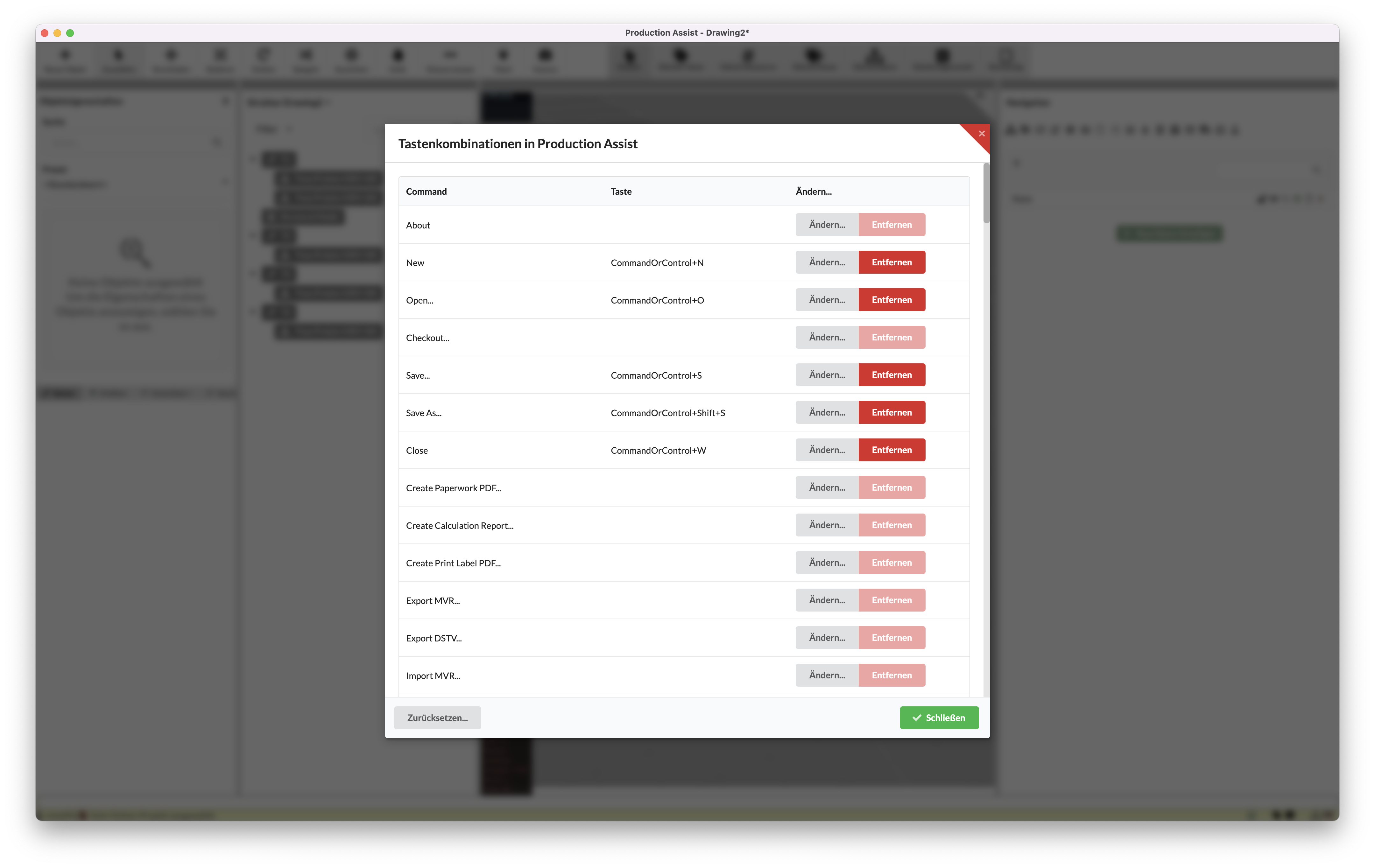
Note: CommandOrControl means that on Mac computers the Command key must be used, while on Windows and Linux the Control key.
| Command | Shortcut |
|---|---|
| New | CommandOrControl+N |
| Open | CommandOrControl+O |
| Save | CommandOrControl+S |
| Save As | CommandOrControl+Shift+S |
| Close | CommandOrControl+W |
| Undo | CommandOrControl+Z |
| Redo | CommandOrControl+Shift+Z |
| Duplicate | CommandOrControl+D |
| Edit Defining Resource | CommandOrControl+# |
| Edit Object Definition | CommandOrControl+I |
| Select All | CommandOrControl+A |
| Deselect All | Escape |
| Expand All | CommandOrControl+Shift+K |
| Collapse All | CommandOrControl+K |
| Select Previous Object | Right |
| Select Next Object | Left |
| Select Parent | Up |
| Select child object | Down |
| Move Selected Object to the Right | Shift+Right |
| Move Selected Object to the Left | Shift+Left |
| Move Selected Object to Front | Shift+Up |
| Move Selected Object to the Back | Shift+Down |
| Move Selected Object Up | Shift+Alt+Up |
| Move Selected Object Down | Shift+Alt+Down |
| Add Previous Object to Selection | CommandOrControl+Shift+Right |
| Add Next Object to Selection | CommandOrControl+Shift+Left |
| Add Upper Object to Selection | CommandOrControl+Shift+Up |
| Add Lower Object to Selection | CommandOrControl+Shift+Down |
| Create Assembly Sheet | CommandOrControl+J |
| Create Dimensioning | CommandOrControl+Y |
| Merge Selected Objects | CommandOrControl+Shift+M |
| Group Selected Objects in Assembly Group | CommandOrControl+G |
| Power Patch | CommandOrControl+P |
| Data Patch | CommandOrControl+L |
| Delete Power Patch | CommandOrControl+Shift+P |
| Delete Data Patch | CommandOrControl+Shift+P |
| Zoom to Selection | F |
| Front View | num2 |
| Back View | num8 |
| Left View | num4 |
| Right View | num6 |
| Top View | num5 |
| Bottom View | num0 |
| Front Left View | num1 |
| Front Right View | num3 |
| Rear Left View | num7 |
| Rear Right View | num9 |
| Isometric or Ortho View | C |
| Update from Current Branch | CommandOrControl+U |
| Open Online Help | CommandOrControl+Shift+H |
| Open Online Glossary | CommandOrControl+Shift+G |
| Cancel Active Tool | Escape |
| Move Objects | M |
| Rotate Objects | R |
| Select Single Object | X |
| Select Object with Same Name in Scene | CommandOrControl+Shift+S |
| Select Object with Same Name in Assembly Group | S |
| Rectangle Object Selection | B |
| Show QR Code Reader | Q |
Also in the renderer:
| Command | Shortcut |
|---|---|
| Insert: Rotate the truss to be inserted around its axis | Shift |
| Insert: Switch between the magnets of the truss to be inserted | Control |
| Rotate: Switch between different rotation points | Control |
| Command | Shortcut |
|---|---|
| Add Lower Object to Selection | num8 |
| Add Next Object to Selection | Shortcut |
| Add Previous Object to Selection | num0 |
| Add Upper Object to Selection | Escape |
| Back View | CommandOrControl+W |
| Bottom View | CommandOrControl+K |
| Cancel Active Tool | CommandOrControl+J |
| Close | CommandOrControl+Y |
| Collapse All | CommandOrControl+L |
| Create Assembly Sheet | CommandOrControl+Shift+P |
| Create Dimensioning | CommandOrControl+Shift+P |
| Data Patch | Escape |
| Delete Data Patch | CommandOrControl+D |
| Delete Power Patch | CommandOrControl+# |
| Deselect All | CommandOrControl+I |
| Duplicate | CommandOrControl+Shift+K |
| Edit Defining Resource | num1 |
| Edit Object Definition | num3 |
| Expand All | num2 |
| Front Left View | CommandOrControl+G |
| Front Right View | C |
| Front View | num4 |
| Group Selected Objects in Assembly Group | CommandOrControl+Shift+M |
| Isometric or Ortho View | M |
| Left View | Shift+Down |
| Merge Selected Objects | Shift+Alt+Down |
| Move Objects | Shift+Up |
| Move Selected Object Down | Shift+Left |
| Move Selected Object to Front | Shift+Right |
| Move Selected Object to the Back | Shift+Alt+Up |
| Move Selected Object to the Left | CommandOrControl+N |
| Move Selected Object to the Right | Left |
| Move Selected Object Up | CommandOrControl+O |
| New | CommandOrControl+Shift+G |
| Open | CommandOrControl+Shift+H |
| Open Online Glossary | CommandOrControl+P |
| Open Online Help | Right |
| Power Patch | num7 |
| Rear Left View | num9 |
| Rear Right View | B |
| Move objects | CommandOrControl+Shift+Z |
| Redo | num6 |
| Open online glossary | R |
| Open online help | CommandOrControl+S |
| Save | CommandOrControl+Shift+S |
| Save As | CommandOrControl+A |
| Renderer: Rotate the truss to be inserted around its axis | Shift |
| Renderer: switch between the magnets of the truss to be inserted | Control |
| Renderer: switch between different rotation points | Control |
| Select All | CommandOrControl+Shift+Down |
| Close | CommandOrControl+Shift+Left |
| Select Child | S |
| Select Next Object | Down |
| Select Object with Same Name in Assembly Group | CommandOrControl+Shift+Right |
| Select Object with Same Name in Scene | X |
| Select Parent | CommandOrControl+Shift+Up |
| Select Previous Object | Q |
| Show QR Code Reader | num5 |
| Top View | CommandOrControl+Z |
| Undo | Up |
| Update from Current Branch | CommandOrControl+U |
| Zoom to Selection | F |